The Best Gaming Handhelds in 2026: Choose Your Fighter
We compared the best current handhelds through the games they can run, how they work while travelling and whether older models preserve the parts that matter.

We started looking for the best gaming handheld for travel because our requirements seemed fairly straightforward: we play far too much UFC, still sink hours into EA Sports FC Career Mode, and every so often I want to go back to an older PC strategy game such as Dawn of War II. The obvious solution was to buy the most capable handheld available, preferably something powerful enough to replace several devices rather than carrying one machine for console games and another for PC.
The problem is that gaming handhelds now sit on very different platforms, so raw hardware doesn't tell you which one is best. UFC 6 is only available on PlayStation 5 and Xbox Series X|S, meaning even the fastest Windows handheld cannot install it locally, while a much cheaper PlayStation Portal can stream it from a PS5. Dawn of War II pushes the decision the other way, where Windows compatibility, a larger display, and mouse-style controls matter much more, while EA Sports FC adds SteamOS and anti-cheat compatibility into the mix.
So instead of chasing one universal winner, we are comparing the best current handhelds from ASUS ROG, Lenovo, MSI, Valve, Nintendo and Sony around the games they are actually good at, then looking at how much of that experience older or cheaper hardware can preserve.
Quick answer
The ROG Xbox Ally X20 is the most complete premium Windows handheld here when the built-in screen and controls matter: it combines an AMD Ryzen AI Z2 Extreme processor, 24GB of memory, an 80Wh battery and a 7.4-inch 1080p OLED display with variable refresh rate. The ROG Xbox Ally X uses the same processor, memory amount and storage capacity for $300 less, which makes it the more sensible high-end Windows choice when OLED is not part of the reason for buying.
The Lenovo Legion Go Gen 2 is our first choice for strategy games, small interface text and anyone who wants the handheld to become a little tabletop computer, because its 8.8-inch OLED screen, kickstand and detachable controllers change how the device can be used. The MSI Claw A8 is the other serious 8-inch Windows option, with the Ryzen Z2 Extreme, a 120Hz variable-refresh display and an 80Wh battery in a more conventional fixed-controller body.
The Steam Deck OLED remains the easiest PC handheld to live with when the important games work on SteamOS, while Nintendo Switch 2 is the right answer when Nintendo's library is the point. PlayStation Portal is the cleanest dedicated route into PS5 Remote Play and supported cloud streaming, while a Windows handheld can combine Xbox Remote Play with PC games installed on its own SSD. Those streaming routes still depend on the connection, so neither replaces a local library for a flight.
| What you want | Best place to begin | Why it fits | What can ruin the answer |
|---|---|---|---|
| Highest-spec Ally with the best built-in screen | ROG Xbox Ally X20 | OLED HDR, refined controls, AI Z2 Extreme and 80Wh battery | The $999.99 Ally X has the same main processor, memory and storage |
| High-end Windows without paying for the X20 finish | ROG Xbox Ally X | Broad PC library, strong current processor and large battery | Windows still asks for updates, launcher sign-ins and occasional desktop use |
| Strategy games and the largest useful screen | Lenovo Legion Go Gen 2 | 8.8-inch OLED, kickstand and detachable controls | It is large and heavy for long sessions in the hands |
| Eight-inch Windows alternative | MSI Claw A8 | Z2 Extreme, 24GB memory, 80Wh battery and 120Hz VRR | Availability and pricing vary sharply by country |
| Compatible Steam library with the least fuss | Steam Deck OLED | SteamOS, trackpads, excellent sleep and resume behaviour | Unsupported anti-cheat or third-party launchers can block an essential game |
| Nintendo games and easy TV play | Nintendo Switch 2 | Nintendo library, included dock and confirmed FC 27 version | It cannot install a Windows or Steam library |
| A PlayStation library away from the television | PlayStation Portal | Console-quality controls, PS5 Remote Play and supported cloud streaming | It depends on the network and cannot install games locally |
| Xbox Remote Play plus local PC games | A Windows handheld | One device can stream the console and install supported PC games | The streamed game still depends on the console and internet connection |
Our UFC question explains the whole problem
EA's UFC 6 FAQ lists PlayStation 5 and Xbox Series X or S, with no Windows, Steam or Nintendo version. That means ROG, Lenovo, MSI and Valve hardware cannot install it locally, regardless of how much the device costs. A more powerful chip can improve a demanding PC game; it cannot create a port that EA did not release.
There are still several ways to play it away from the television:
| Route | What runs the game | Travel hardware | Main advantage | Main weakness |
| PS5 Remote Play | Your PS5 at home | PlayStation Portal, or a supported phone, tablet, PC or Mac with a PlayStation controller | Uses the copy and progress already on the console | Your home console and both internet connections become part of every session |
| PlayStation cloud streaming | Sony's servers | PlayStation Portal with PlayStation Plus Premium | No need for your own PS5 to render the game when the title is eligible | Subscription, region, game eligibility and hotel Wi-Fi decide whether it works |
| Xbox Remote Play | Your Xbox at home | Windows handheld, PC, phone or tablet | A ROG Ally can stream a console game and still install separate PC games locally | The Xbox must be prepared for remote access, and network delay remains |
| Xbox cloud gaming | Microsoft's servers | Supported browser or Xbox app device | No home console needs to remain available | Only supported cloud titles work; never assume a new console release is included |
Sony's listing says the game supports Remote Play and PS5 or PlayStation Portal cloud streaming with a Premium subscription. Xbox officially supports Remote Play from an Xbox console to Windows 10 or 11 devices, which gives an Ally, Legion or Claw a legitimate route into the Xbox version. We found no official promise that this version was included in Xbox cloud gaming on our fact-check date, so the article should not present that as guaranteed.
For somebody who mainly wants this one game and already owns a PS5, the Portal is the cleanest dedicated answer because its controls are built around the PlayStation version and Sony supports that route. An Xbox owner who also wants FC, Steam games and old PC titles installed locally gets more use from a Windows handheld, because Remote Play can handle the console game while the PC library remains on the SSD.
There is no clever answer for a long flight without reliable internet. The portable routes are streams, so the travel requirement matters more than the handheld benchmark. This is why “What do you want to play, and will you have a connection?” belongs above the specification table.
Three different meanings of “it can play the game”
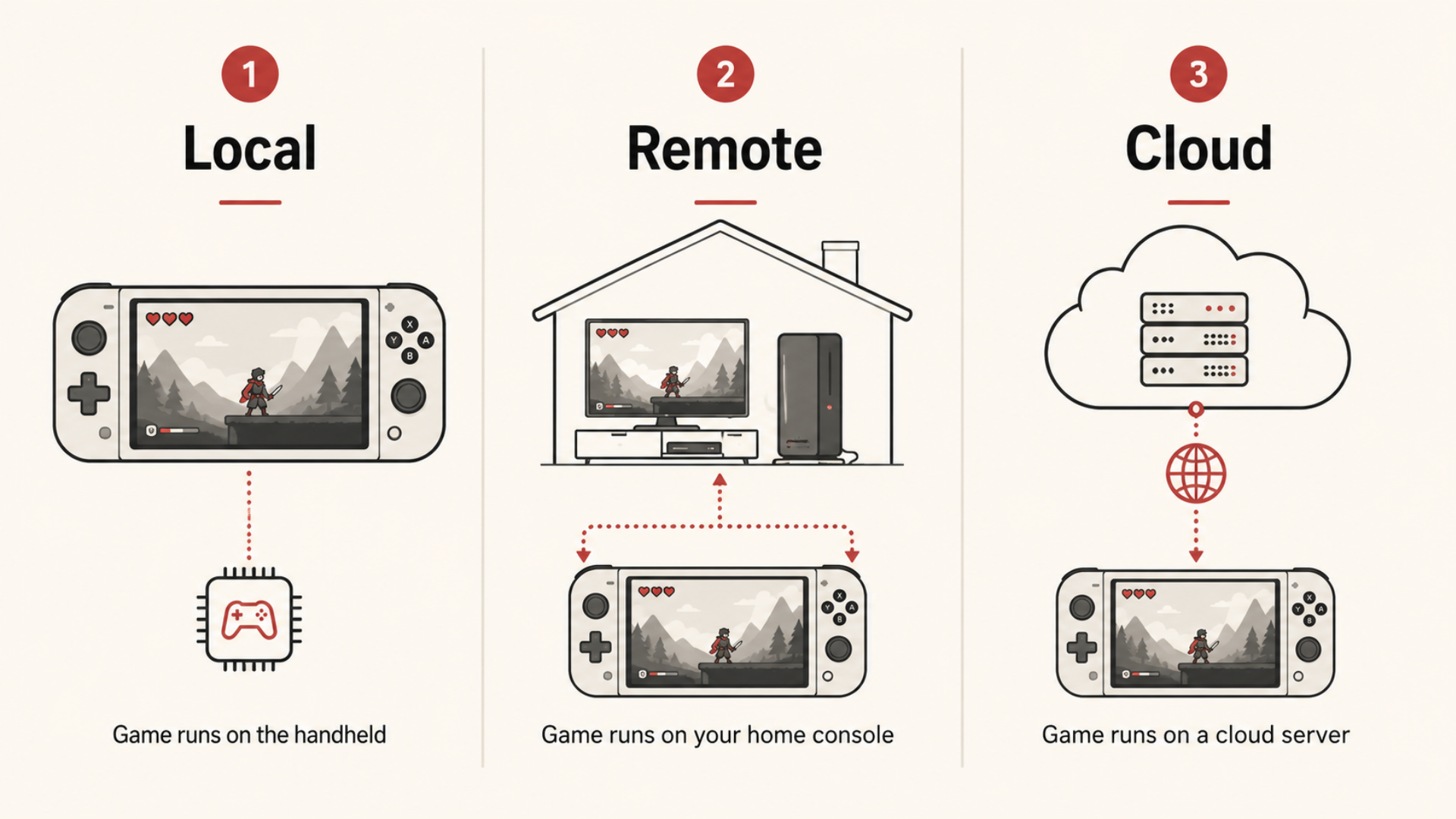
Handheld discussions often mix local play, remote play and cloud gaming into one compatibility claim, although the experience and risks are different.
Local play means the game is installed on the handheld and its processor renders every frame. This is the best route for a plane, train, weak hotel connection or any game where input delay is annoying. Windows handhelds install supported PC versions, Steam Deck runs compatible games through SteamOS and Proton, and Switch 2 runs its own Nintendo versions.
Remote play means a console or PC you own runs the game somewhere else and sends video to the handheld. The travel device becomes a screen and controller, while your home upload speed, hotel download speed, router and latency decide the result. It is useful for console games without local handheld versions, but it should be tested before the trip rather than discovered from an airport lounge.
Cloud gaming removes the home console and rents the remote machine through a subscription or supported purchase. It can put console games on a small device that could never run them locally, although the catalogue, region and subscription can change. A game being sold on Xbox does not automatically mean it can be streamed from the Xbox cloud.
The right purchase can use all three, but only local play survives when the internet disappears.
The best current handhelds, before we argue about value
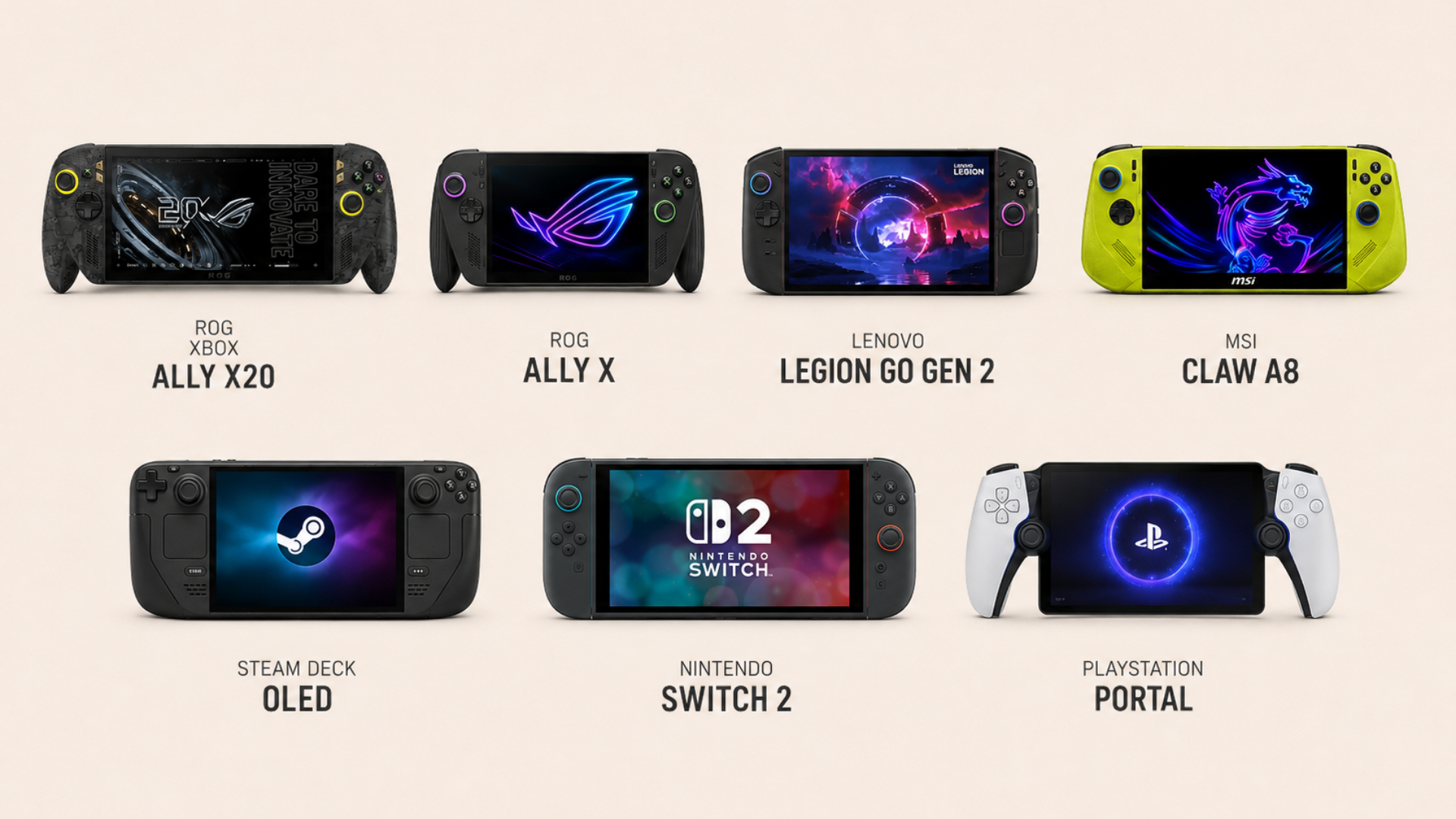
The prices below are official US prices or current manufacturer starting prices checked on 28 August 2026. They are useful reference points rather than a universal order, because regional taxes, retailer discounts and configurations can move one machine hundreds of dollars above another.
| Device | Price checked | Processor and system | Screen | Memory and storage | Battery | Best reason to choose it |
| ROG Xbox Ally X20 | $1,299.99 | Ryzen AI Z2 Extreme, Windows 11 | 7.4-inch 1920 x 1080 OLED HDR, 120Hz, VRR | 24GB, 1TB | 80Wh | Best Ally screen and control hardware |
| ROG Xbox Ally X | $999.99 | Ryzen AI Z2 Extreme, Windows 11 | 7-inch 1920 x 1080 IPS, 120Hz, VRR | 24GB, 1TB | 80Wh | High-end Windows without the X20 display premium |
| Lenovo Legion Go Gen 2 | From about $1,049.99 by current configuration | Up to Ryzen Z2 Extreme, Windows 11 or SteamOS | 8.8-inch 1920 x 1200 OLED, 144Hz, VRR | Up to 32GB, up to 2TB | 74Wh | Large screen, kickstand and detachable controllers |
| MSI Claw A8 | Around $999 by current US listing | Ryzen Z2 Extreme, Windows 11 | 8-inch 1920 x 1200 IPS, 120Hz, VRR | 24GB, 1TB | 80Wh | Large fixed-body Windows handheld with strong battery |
| Steam Deck OLED 512GB | $789 | Valve 6nm AMD APU, SteamOS | 7.4-inch 1280 x 800 OLED HDR, up to 90Hz | 16GB, 512GB | 50Wh | Best controller-led PC experience for a compatible Steam library |
| Nintendo Switch 2 | $449.99 until 1 September, then $499.99 | Nintendo system | 7.9-inch 1920 x 1080 LCD, up to 120Hz | 256GB storage | Not disclosed in Wh | Nintendo games and simple docked play |
| PlayStation Portal | $249 | Streaming device for PS5 and supported cloud titles | 8-inch 1920 x 1080 LCD, up to 60fps | No local game storage | Not positioned for local play | Dedicated PlayStation streaming with console-style controls |
Raw screen resolution does not tell you which display is most useful. The X20 has the richer OLED panel in a compact body, the Legion gives strategy interfaces more physical room, the Deck balances a lower resolution with modest hardware and the Portal only needs to display a stream that another machine has rendered. The winning number changes with the job.
ROG Xbox Ally X20: the finest Ally, if you use the parts you paid for
ASUS's $1,299.99 X20 takes the Ryzen AI Z2 Extreme, 24GB of memory, 1TB SSD and 80Wh battery from the current Xbox Ally X, then builds a more luxurious machine around them. Its 7.4-inch OLED panel runs at 1080p and 120Hz, supports HDR and a 30 to 120Hz variable-refresh range, while the controls move to TMR sticks, impulse triggers and a D-pad that can switch between four and eight directions.
This is the premium winner for somebody who wants a Windows library, plays mostly on the built-in screen and cares about display quality and controls every time the machine comes out of the case. It is a weaker fit when most play happens on a television, because the expensive OLED panel becomes a black rectangle under the TV while the cheaper Ally X sends the same class of processor to the dock.
Pros
- The best built-in display in the Ally family.
- Ryzen AI Z2 Extreme, 24GB memory and 80Wh battery.
- TMR sticks, improved triggers and a configurable D-pad.
- Windows library, Xbox Mode, Remote Play and the main PC storefronts.
Cons
- $1,299.99 before a dock, case or extra controller.
- No processor, memory-capacity or storage-capacity advantage over the $999.99 Ally X.
- Premium screen adds little during regular TV play.
- Windows can still expose small menus and launcher problems on a handheld display.
TGK take: If price is removed from the argument and we want the best Ally to use in our hands, this is it. The case becomes weaker the moment OLED and the improved controls stop affecting how we play.
ROG Xbox Ally X: the strongest simple answer for high-end Windows
The current $999.99 Ally X uses the same Ryzen AI Z2 Extreme, 24GB memory, 1TB storage and 80Wh battery as the X20, but keeps a 7-inch 1080p IPS display. It also carries Xbox-style grips and can begin in Microsoft's controller-led Xbox Mode, while Windows remains available underneath for Steam, the EA app, Epic and older PC software.
Its main strength is balance. The battery is large, the processor sits in the current high tier and the body is easier to treat as a normal controller than the first Ally. It lacks the X20's OLED and Lenovo's large display, although neither omission stops it doing the broad Windows job.
Pros
- Current high-tier AMD processor with 24GB of fast memory.
- 80Wh battery and 1TB SSD.
- Windows access to multiple PC stores and Xbox Remote Play.
- More defensible than the X20 when the built-in screen is not the main event.
Cons
- $999.99 is already gaming-laptop territory.
- IPS rather than OLED.
- No trackpad for mouse-heavy games.
- Broader compatibility comes with more software maintenance than SteamOS or Nintendo.
TGK take: This is where we would begin for a new premium Windows purchase, especially when the travel list contains locally installed PC games and Xbox Remote Play. We would move to the X20 for its screen, not because its product name sounds more powerful.
Lenovo Legion Go Gen 2: the best screen for games that look cramped elsewhere
Lenovo's second large Legion keeps the format that made the first model different: an 8.8-inch display, detachable controllers, two USB4 ports and a kickstand. The new version moves to a 1920 by 1200 OLED screen with a 144Hz refresh rate and variable refresh, offers up to the Ryzen Z2 Extreme, 32GB of memory and 2TB storage, and raises the battery to 74Wh.
That physical screen size can matter more than another few frames in Dawn of War, Civilization, Football Manager, Crusader Kings or any older PC game designed around a monitor. The right controller can also become a vertical mouse, while the kickstand lets both controllers come off when holding a 920g device stops being fun.
Pros
- Largest and most useful built-in screen in this comparison.
- OLED, 144Hz and variable refresh.
- Detachable controllers, kickstand and mouse-style control.
- Up to 32GB memory and two convenient USB4 ports.
Cons
- Large and heavy beside the Deck and Ally.
- Configuration names, processors and operating systems need careful checking.
- A 1200p screen can tempt owners into demanding settings the processor cannot hold.
- It is less comfortable as a small carry-everywhere device.
TGK take: The Legion is not the one we would buy for a smaller number on a benchmark. We would buy it because an 8.8-inch strategy map, kickstand and detachable control setup solve a problem the compact machines do not.
MSI Claw A8: the large Windows alternative without removable controls
MSI's Claw A8 uses the Ryzen Z2 Extreme with 24GB of LPDDR5X memory, an 80Wh battery and an 8-inch 1920 by 1200 IPS display running at 120Hz with variable refresh. It keeps its controllers attached and uses Hall effect sticks and triggers, which makes it closer to a larger Ally than a modular Legion.
MSI claims an average 29 percent frame-rate gain over a Z1 Extreme under its own selected settings and games. That figure belongs to MSI's test rather than ours, and it should not be applied to every title, although the official specification still places the A8 in the current high-performance group.
Pros
- Current Z2 Extreme with 24GB of memory.
- Eight-inch 120Hz variable-refresh display.
- 80Wh battery and upgrade-friendly 2280 SSD.
- Fixed body may suit people who do not want detachable parts.
Cons
- IPS instead of the OLED panels on X20 and Legion Go Gen 2.
- Pricing and stock differ considerably between regions.
- MSI's software layer is less familiar than SteamOS or the Ally interface.
- Still a large device for crowded travel bags.
TGK take: A genuine premium option rather than a footnote, especially when an eight-inch screen and 80Wh battery matter more than detachable controllers. We would compare the local A8 and Ally X prices directly, because either can become silly when the other is discounted.
Steam Deck OLED: the best PC handheld experience when the games agree
Steam Deck OLED has an older and slower processor than the new Windows flagships, 16GB of memory and a 7.4-inch 1280 by 800 OLED screen running at up to 90Hz. On a pure specification chart it loses quickly, although the chart misses SteamOS, the two trackpads, good sleep and resume behaviour and Valve's compatibility labels beside each game.
Valve raised the 512GB OLED price to $789 in August 2026 without changing the hardware, which makes the purchase harder to defend on value alone. The experience remains the reason to buy it. When the library is compatible, the Deck behaves more like a finished handheld and less like a small laptop waiting for a touchscreen.
Pros
- SteamOS is built around controls rather than a desktop.
- Trackpads help strategy, management and old mouse-led games.
- Excellent OLED display and sensible 800p target.
- Deck Verified exposes many compatibility problems before purchase.
Cons
- Weaker processor than the current premium Windows group.
- Some anti-cheat systems and third-party launchers remain blocked or awkward.
- Game Pass PC downloads and the normal EA app are not native SteamOS routes.
- The 2026 price increase puts it close to faster hardware.
TGK take: It can still be the best machine in daily use, provided the five games at the top of your list work. Our separate guide explains whether the Steam Deck still makes sense after the 2026 price increase.
Nintendo Switch 2: the best Nintendo handheld, which is a different question
Switch 2 has a 7.9-inch 1080p handheld screen, detachable Joy-Con 2 controllers and a dock in the box. It runs Nintendo's current games and EA has confirmed FC 27 for the system, while the US price moves from $449.99 to $499.99 on 1 September 2026.
It cannot install Steam, Xbox PC games, the Windows EA app or Dawn of War II because Nintendo sells a different platform and library. Anyone whose list begins with Mario Kart, Zelda and Nintendo multiplayer should not buy a Windows PC because a processor comparison told them to.
Pros
- Current Nintendo library and exclusive games.
- Included dock makes television play simple.
- Confirmed FC 27 version.
- Lower and lighter purchasing decision than a four-figure Windows flagship.
Cons
- No existing Windows or Steam library.
- No PlayStation, Xbox or Windows catalogue.
- PC mods and old PC software are outside its job.
- Nintendo game and subscription costs still belong in the full budget.
TGK take: The best Nintendo machine is Switch 2, while our mixed list of FC, old PC strategy games and console streaming needs something broader.
PlayStation Portal: the best dedicated PlayStation streaming tool
Portal has an 8-inch 1080p LCD screen running at up to 60 frames per second, with DualSense-style controls around it. It can stream compatible games from a PS5 and, with PlayStation Plus Premium in a supported region, stream selected PS5 games from Sony's cloud. The current US price is $249.
For UFC 6, this dedicated limitation becomes a strength. There is no Windows setup or controller-mapping experiment; Sony's listing says the game supports Remote Play and Portal cloud streaming. The same simplicity applies to the rest of a supported PlayStation library, although Portal remains useless without a suitable connection and cannot install a single game for the plane.
Pros
- DualSense-style controls match the PlayStation versions being streamed.
- Eight-inch 1080p screen and DualSense features.
- Lower hardware cost when a PS5 or Premium library already exists.
- No small Windows desktop to manage.
Cons
- Streaming only, with no local game installation.
- Network quality can add delay or stop play.
- Cloud availability varies by title, country and subscription.
- Cannot replace a Steam, Windows or Nintendo handheld.
TGK take: Calling Portal weaker than an Ally misses the job. For a PS5 owner who wants the cleanest hotel-room stream, it may be the better tool; for a flight or a mixed PC library, it is not even in the competition.
Match the machine to the games, not the genre label
The five-game list should include exact titles rather than categories, because two games from the same publisher can require different platforms, launchers or controls.
UFC 6: choose the streaming route
UFC 6 is console-only, so PS5 owners should begin with Portal and Xbox owners should begin with Xbox Remote Play on a Windows handheld or another supported device. If the trip includes weak Wi-Fi or long offline periods, accept that UFC is not the travel game and choose another title that installs locally.
EA Sports FC: Windows and Switch 2 are the safer current routes
EA Sports FC 26 is marked Unsupported on Steam Deck, while FC 27 remains marked Unknown before its September release. EA has confirmed Windows PC and Switch 2 versions, so those platforms give the game its intended local route, although final handheld performance still needs the released game.
Anyone buying specifically for FC 27 should wait for finished-game tests if possible. Windows makes compatibility more likely, not guaranteed performance on every power setting, and buying a Steam Deck on the assumption that an Unknown rating will become supported is a gamble. Our Career Mode realism guide applies after the platform problem is solved.
Dawn of War II and strategy games: controls can matter more than speed
Dawn of War II Anniversary Edition is marked Playable on Steam Deck, and the Deck's trackpads make its mouse-led interface easier than two plain sticks. Legion Go Gen 2 offers another route through its large screen, kickstand and mouse-style right controller, while any Windows handheld can use a compact mouse when there is a table.
A powerful Ally can run an old strategy game, but it does not create the missing pointer. If this genre fills most evenings, the Legion and Deck deserve priority before the processor ranking begins.
New demanding PC games: start with the current Z2 Extreme group
ROG Xbox Ally X20, Xbox Ally X, Legion Go Gen 2 and MSI Claw A8 all offer current high-tier AMD options, larger memory pools and batteries between 74 and 80Wh. The exact winner depends on game testing, power limits and cooling, while the physical decision is easier: X20 for its compact OLED and controls, Ally X for balance, Legion for screen and modular use, or Claw for an eight-inch fixed body.
Nintendo games: buy Nintendo
Emulation arguments do not replace current hardware, a legal game purchase, online features or the convenience of a system designed for its own catalogue. If the games that matter are Nintendo games, Switch 2 is the direct answer.
Older, indie and emulated games: premium power may sit unused
Steam Deck OLED already has enough performance for a large older and indie library, while its lower-resolution display helps the processor. An old Ally Z1 Extreme can also be excessive for this job, which is where the cheaper section later becomes uncomfortable for the new flagships.
SteamOS, Windows and Nintendo change daily use more than a small benchmark lead
SteamOS gives the cleanest controller-led PC experience, quick access to Steam settings and two trackpads, while Valve's Verified, Playable, Unsupported and Unknown labels make compatibility visible before purchase. Proton runs many Windows games, but publishers still decide whether certain anti-cheat systems and launchers support it.
Windows opens Steam, Xbox, EA, Epic and ordinary PC software, while Xbox Mode now gives supported handhelds a more controller-friendly start. The desktop remains underneath, which is good when an old game needs a file changed and annoying when an updater produces a tiny dialogue box.
Nintendo offers the narrowest computer and the most predictable console. PlayStation Portal offers no local operating system choice at all, because it is a window into a PS5 or supported Sony cloud game. None is universally superior; each removes one kind of friction and introduces another.
The travel test is different from the sofa test
A handheld that works perfectly on the sofa can become awkward once the trip begins, because charging, offline launchers, Wi-Fi and two hours of holding it now matter. Before leaving, we would check five things.
- Can every specific game run locally? FC 27, Dawn of War II, a new demanding release and a favourite indie can give four different answers on the same device. Check the exact titles rather than trusting a general compatibility label.
- Can every launcher start offline? Open and update the games, sign in, enable the relevant offline mode and test with Wi-Fi disabled before packing. A game stored on the SSD is not much use when its launcher refuses to open.
- Will the battery and charger survive the route? Current Windows machines may need a 65W charger for higher power modes, while a weak shared adapter can leave the battery falling during play. Older games and indies may run comfortably at lower settings for longer.
- Do the screen and controls suit the games? FC works naturally with ordinary sticks and buttons, while Dawn of War II, Football Manager and Civilization benefit from a trackpad, mouse-style control or enough table space for a compact mouse. A large screen helps their smaller text, although a 900g machine can become tiring in the hands.
- Which games depend on the network? Remote Play, cloud gaming, online modes and launcher checks can all fail on hotel Wi-Fi. Captive portals, unstable latency and a weak home upload connection matter as much as the advertised download speed.
For our mixed travel list, a high-end Windows handheld covers the widest ground: FC and supported PC games can stay on the SSD, older strategy games can use a compact mouse, and Xbox Remote Play remains available when the connection behaves. Legion moves ahead when the large screen and strategy controls matter most, Steam Deck is easier when the exact library passes Valve's checks, Switch 2 wins for Mario Kart and Zelda, and Portal makes sense when PlayStation streaming is the main job. On a flight, local compatibility and battery life decide the useful options, so we would prepare several games before leaving home.
Which handheld works best on a television?
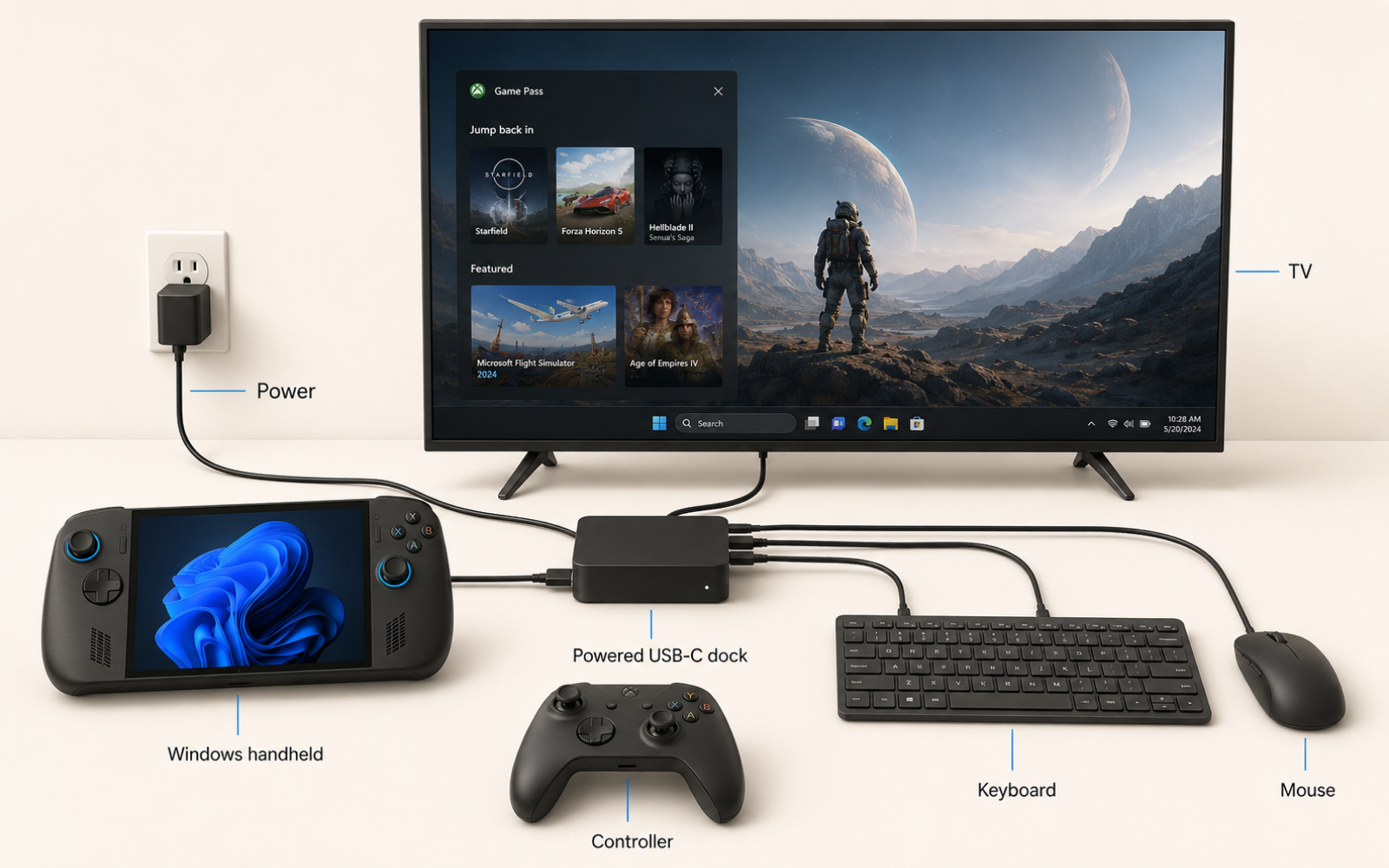
Steam Deck, Windows handhelds and Switch 2 can all use a television. Steam Deck and the Windows machines need a suitable USB-C dock or adapter, while Switch 2 includes its dock. Portal is a remote display rather than a television console and does not belong in this part of the comparison.
A dock carries power, video and accessories; it does not add a desktop graphics card. A demanding game may still render at 720p, 900p or 1080p before the television scales it to a 4K panel. For regular TV play, include the powered dock, charger, controller and possibly a keyboard and mouse in the purchase.
The built-in screen also becomes less important when the machine lives below the TV. X20's OLED is one of its strongest reasons to exist, while Ally X can send the same processor class to the television for $300 less. Legion's detachable controllers and kickstand remain useful away from the dock, and Switch 2 has the tidiest transition.
If the device will spend nearly all of its life connected to the television, compare the full price with a console or small gaming PC. Handheld buyers pay for a screen, battery and attached controls, and a dock cannot recover the value of features that never leave the cabinet.
What would TGK choose for our travel bag?
There is no single purchase that runs every PC launcher, provides Nintendo games, streams both console libraries and remains perfect without internet. For our own discussion, the answer divides by the games and the trip.
If one premium device must carry local FC, Dawn of War II, newer PC games and Xbox Remote Play, we would choose the ROG Xbox Ally X. It has the current high-tier processor, 24GB memory, 1TB storage and 80Wh battery without charging another $300 for an OLED screen that we may not value on every trip. We would choose the X20 instead when display quality and its improved controls are part of the enjoyment rather than decorations on the invoice.
If a PS5 library is the main task and we expect dependable Wi-Fi, we would take the PlayStation Portal, then accept that a separate local device or phone game handles the plane. If strategy games dominate the trip, the Legion Go Gen 2 moves ahead because its screen and controls improve the game every minute, while the Steam Deck OLED is the nicer travel computer when the exact library passes Valve's compatibility check. Switch 2 remains the uncomplicated answer when the trip is mostly about Nintendo games.
This answer is less exciting than declaring one machine the king, but it survives contact with the games.
The expensive answer is finished. Now let the practical friend speak
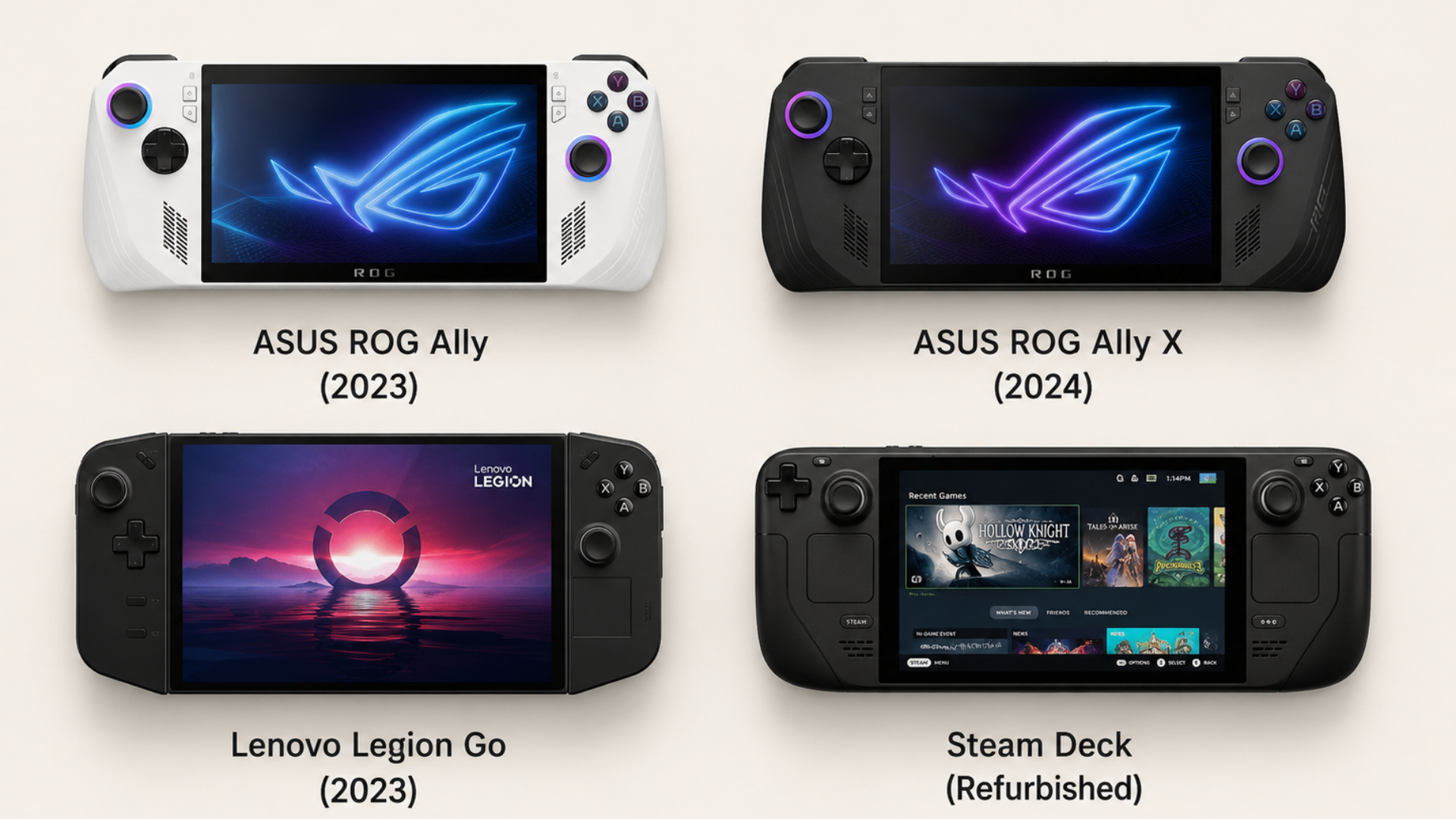
Somebody will look at a $1,299.99 X20 and ask why anyone would spend that much when a 2024 Ally X, original Legion Go or refurbished Deck can perform most of the same job. That question should not lead the article because price can distract from platform compatibility, although it becomes useful after the correct type of machine is known.
The cheaper model rarely gives the exact premium experience. It may have a smaller battery, older screen, weaker controls, shorter warranty or less performance, but those losses only matter when they reach the games and places that made us shop.
| Premium answer | Cheaper reasonable option | What stays | What you lose |
| ROG Xbox Ally X20 at $1,299.99 | Used or clearance 2024 ROG Ally X Z1 Extreme | Windows stores, 24GB memory, 1TB storage, 80Wh battery and TV output | OLED, current processor, new controls, new-product warranty |
| ROG Xbox Ally X at $999.99 | Used original ROG Ally Z1 Extreme | Windows, Z1 Extreme performance tier, 1080p VRR screen and PC library | 80Wh battery, 24GB memory, 1TB storage, improved grips and warranty |
| ROG Xbox Ally X at $999.99 | Current base ROG Xbox Ally at $599.99 | New warranty, Xbox body, Windows stores, 1080p VRR screen and 60Wh battery | The base Z2 A is an efficiency chip rather than a cheaper Z2 Extreme |
| Legion Go Gen 2 | Used original Legion Go Z1 Extreme | 8.8-inch format, kickstand, detachable controls, Windows and two USB4 ports | OLED, VRR, larger battery, newer processor and more memory |
| Steam Deck OLED 512GB at $789 | Refurbished Deck OLED or discounted LCD Deck | SteamOS, trackpads, compatibility system and local Steam library | OLED on LCD models, battery life, display quality and new warranty length |
| PlayStation Portal at $249 | Existing phone or tablet with a supported PlayStation controller | PS Remote Play through hardware you already own | Integrated DualSense controls, eight-inch layout and one-piece convenience |
| Nintendo Switch 2 | Used Switch OLED, only if the required games exist there | Nintendo's older library and included handheld controls | Switch 2 exclusives, performance, newer features and certain game versions |
X20 versus 2024 Ally X: the comparison that hurts most
The first ROG Ally X kept the older Z1 Extreme but fixed the original Ally around it, with 24GB memory, 1TB storage and an 80Wh battery. That means a used one preserves Windows, the main PC storefronts, strong battery life and enough memory for a mixed library, while the X20 adds a newer processor, OLED screen and better control hardware.
For somebody who plays demanding current PC games on the built-in screen, the premium improvements can remain visible. For our FC, strategy and TV mix, the older Ally X can be the more rational machine because the library and battery survive the price cut.
Current Ally X versus original Ally Z1 Extreme: pay for the life around the processor
The original 2023 Ally Z1 Extreme has 16GB memory, a 512GB SSD, 7-inch 1080p 120Hz VRR display and a small 40Wh battery. It can run the same Windows stores and use Xbox Remote Play, while its older high-tier processor remains useful.
The current Ally X earns its money through the larger battery, memory, storage, body and newer processor rather than permission to open Steam. If most sessions happen near a charger and the games are not cutting edge, a clean original Ally can preserve the important job for far less.
What about the current $599.99 base Xbox Ally?
The base model is a reasonable cheaper purchase when a new warranty, 60Wh battery and Xbox-shaped body matter more than maximum performance. It has 16GB memory, 512GB storage and the same 7-inch 1080p 120Hz variable-refresh display size used across the current non-X20 Ally range.
Its Ryzen Z2 A needs to be read properly. AMD lists four CPU cores and eight RDNA 2 graphics cores, while the older Z1 Extreme has eight CPU cores and twelve RDNA 3 graphics cores. Those figures do not predict every frame rate, but they do show that “2025 Xbox Ally” and “2023 Ally” are not clean performance tiers. The new base model buys the better battery, body, support and warranty, while a used Z1 Extreme may provide more raw hardware for less money.
Legion Go Gen 2 versus original Legion Go: the screen format survives
The first Legion Go already has an 8.8-inch 2560 by 1600 display, detachable controllers, kickstand, two USB4 ports and a Z1 Extreme. It lacks OLED, variable refresh and the 74Wh battery, and its 49.2Wh pack feels modest beside the new model.
Strategy players still keep the large physical canvas and mouse-style control, which are the features that made Legion different. A discounted original can therefore be a better alternative than a cheaper compact Ally, even when the Ally wins a processor argument.
TGK used-price buy zones
These are purchasing thresholds rather than claimed market averages. They assume a complete machine in good condition with the correct charger, while a retailer warranty, local tax or excellent condition can justify paying more.
| Model | Price that gets our attention | Why it can make sense | When we would walk away |
| Original ROG Ally Z1 Extreme | About $350 to $450, €350 to €450 or £300 to £400 | Cheapest serious Windows route with an older high-tier chip | Near $500, €500 or £450 without strong warranty or accessories |
| 2024 ROG Ally X Z1 Extreme | About $550 to $700, €550 to €700 or £500 to £650 | 80Wh battery, 24GB memory and 1TB storage preserve most of the complete package | When it approaches a discounted current Ally X |
| Original Legion Go Z1 Extreme | About $450 to $600, €450 to €600 or £400 to £550 | Large screen and detachable controls still solve a distinct problem | Premium new-old-stock pricing beside Gen 2 offers |
| Refurbished Steam Deck OLED | At least 20 percent below the matching new model | The interface, trackpads and OLED experience remain | A token discount that does not cover battery age or reduced warranty |
Search sold listings where the marketplace provides them rather than copying ambitious asking prices. Include the charger, storage, case and dock in the calculation, because a cheap handheld with a tired battery and missing 65W adapter can cost more to repair than a complete listing.
What to test before buying used
Check both sticks for drift, every button and trigger, speakers, Wi-Fi, Bluetooth, card reader and every USB-C port. Run a game on battery, confirm that the correct charger enables the expected power mode, inspect the screen for dead pixels and ask for a battery report where the system provides one.
The seller should remove their accounts and complete a reset, while a receipt, serial number and remaining warranty deserve more attention than a box of cheap accessories. On an original Ally, battery condition matters because the pack was small when new; on an original Legion, controller rails and both USB-C ports deserve specific testing.
Questions that matter after the specification table
Does owning an Xbox game mean the Windows handheld version is included?
Only when the title supports Xbox Play Anywhere or the purchase includes a separate PC licence. Microsoft says Play Anywhere titles share the purchase, saves and add-ons across Xbox and Windows 11 handhelds, but the programme covers selected games. UFC 6 is an Xbox Series game rather than a native Windows version, so use Remote Play instead of expecting it in the PC library.
Can I use PlayStation Remote Play on a Windows handheld?
Sony provides PS Remote Play for Windows PCs, but its official controller support is built around DualShock 4, DualSense or DualSense Edge rather than the controls attached to every Windows handheld. Portal avoids that mapping question and provides the PlayStation control layout in one device. People can build other setups, although the article should distinguish them from Sony's supported route.
Can these devices play offline on a flight?
Locally installed games often can, provided the game and launcher support offline play and have been prepared before departure. Remote Play and cloud gaming cannot. Open each travel game, install updates, enable the launcher's offline mode and test once with Wi-Fi disabled while still at home.
Does a dock make a handheld faster?
No. A powered dock may let a Windows handheld use a higher power profile and carries video, power, network and USB accessories, but it does not add a graphics processor. The device still needs a sensible render resolution and settings for the television.
Should I wait for the next Steam Deck?
Wait when the current Deck is expensive in your region and there is no urgent need, but do not buy an unsupported rumour. Valve's current OLED remains unchanged after the 2026 price increase, and no future machine can be judged until Valve publishes its hardware, price and availability.
Is the highest-resolution screen automatically the best?
No. Legion's 8.8-inch physical size helps small interfaces, X20's OLED improves contrast and response, while Deck's 800p target asks less from an older processor. A high native resolution can be useful for text even when demanding games render below it.
How we researched this guide
We checked current manufacturer specifications and prices, Valve's live Deck compatibility labels, EA's UFC 6 and FC 27 platform pages, and Microsoft and Sony support pages for Remote Play, cloud streaming and Windows handheld use. The recommendations combine those facts with our judgment about the games and travel situations described in the article.
We did not publish our own frame-rate or battery benchmark results for machines we have not tested together. Manufacturer performance claims use selected games, settings and power modes, while official battery estimates use different workloads and should not be ranked as if they came from one laboratory.
Prices, compatibility and cloud catalogues can change after publication. The fact-check date shows when we last reviewed them, while the linked manufacturer and game pages remain the final check before spending money.
Primary sources
- EA Sports UFC 6 platform FAQ
- UFC 6 PlayStation features, Remote Play and Portal cloud support
- Xbox Remote Play requirements
- Xbox on Windows handhelds
- PlayStation Portal specifications and current price
- Steam Deck OLED specifications and current models
- Valve's Steam Deck compatibility system
- Valve's Proton and anti-cheat documentation
- Steam Deck Docking Station specifications
- EA Sports FC 26 Steam Deck compatibility
- EA Sports FC 27 Steam page
- EA's confirmed FC 27 platforms
- Dawn of War II Steam Deck compatibility
- ROG Xbox Ally X20 specifications and price
- ROG Xbox Ally X specifications and price
- ROG Xbox Ally family comparison
- AMD Ryzen Z-series processor specifications
- Original ROG Ally specifications
- Original ROG Ally X specification changes
- Lenovo Legion Go Gen 2 specifications
- MSI Claw A8 specifications
- Nintendo Switch 2 system
- Nintendo's September 2026 Switch 2 price revision