How Good Is AI at Jumping? A Jump-Rope Physics Test
Three leading image-to-video models got the same skipping exercise. We compared the movement, faces and sound, including Omni’s suddenly hairy legs.

MiniMax H3, Gemini Omni 1.1 Flash and Wan 3.0 were the top three on Arena’s image-to-video leaderboard when we checked. Our challenge was a ten-second jump-rope video from the same photograph, including roughly six seconds of skipping, while keeping Luna recognisable through the exercise.
Quick Answer
Wan 3.0 made our best overall clip, while Omni had our favourite jumping motion. Appearance and audio count in this ranking too: Wan’s sound helped it win, while Omni’s cartoonish finish and hairy-looking legs kept it second. MiniMax H3 came third because its steadier face couldn’t make up for robotic exercise and clapping-like impacts.
Why Test Something as Simple as Jumping?
Skipping puts several connected actions into the same shot: each turn of the wrists has to carry the rope overhead and beneath the feet while the jumper takes off and lands. If the rope arrives at the wrong moment or the body barely responds to a landing, the exercise looks wrong even when the lighting and face are impressive. Hair and clothing need to respond to those same jumps, without Luna’s features changing halfway through.
Our Seedance 2.5 review already included a five-second jump-rope test, alongside tennis scenes that eventually lost track of the ball. In this comparison, MiniMax, Omni and Wan all received the identical Luna image shown below, with six seconds of skipping requested inside a ten-second sequence.
How We Tested the Three Models
Choosing the Source Image
Source candidates came from Nano Banana 2.1 and GPT Image 2.5 Sunburst, using two reference images of Luna, our recurring TGK AI character. She appears in our tests and advertising experiments, so keeping her recognisable matters beyond this one clip. Our consistent AI character guide covers that problem in more detail.
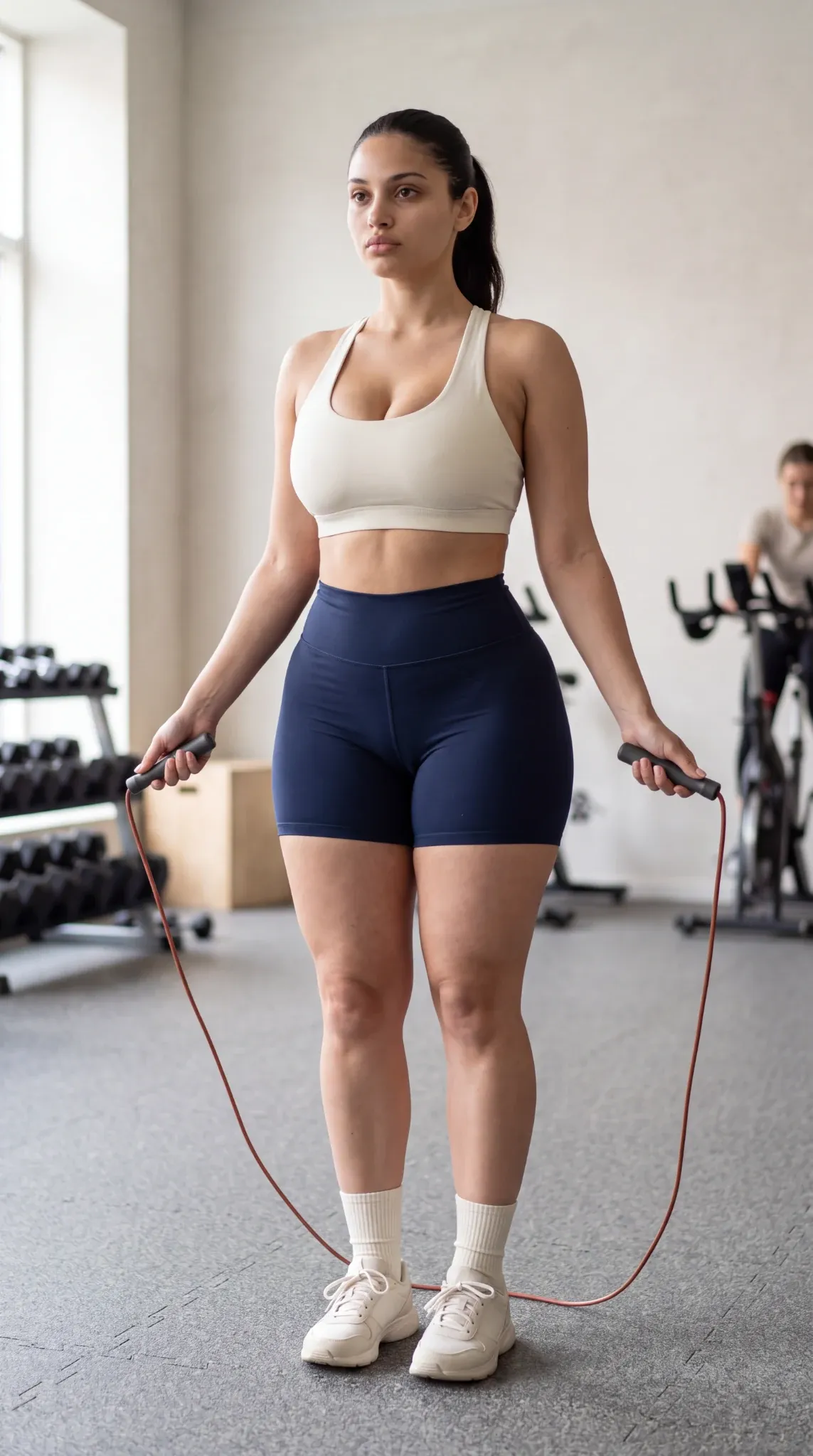
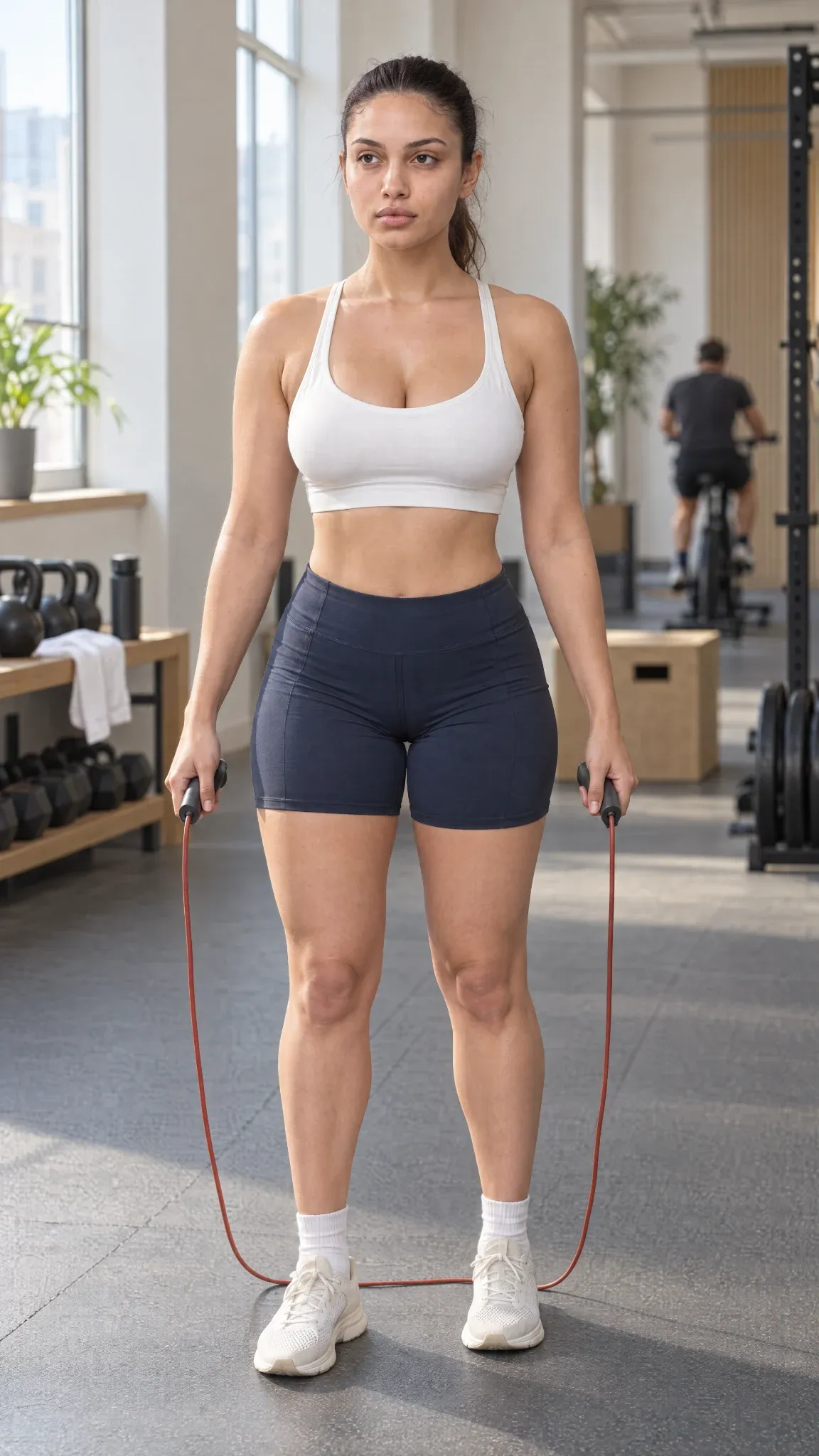
The GPT version became the starting frame for all three videos. Luna faces almost straight towards the camera, with the rope handles, shoes and facial details visible. Natural-looking skin was part of the brief too, as it is in our AI image generator tests.
These extracts show the important parts of the source-image prompt:
Preserve her facial features, body proportions and natural skin texture.
Include her entire body, both shoes and the floor beneath them. Leave approximately two head-heights of clear space above her ponytail for a skipping rope to swing overhead, and a narrow strip of floor below her shoes.
The rest specified an ivory sports bra, navy shorts, a ponytail and soft window light in a Copenhagen training studio. The selected image didn’t deliver the two head-heights of clearance we requested, so the video prompts added a gentle camera pull-back before the first jump.
The Action and Settings
Every model received that same GPT image as its first frame, with a vertical 9:16 video requested at approximately ten seconds. The sequence allowed roughly two seconds to prepare, six seconds to skip and two seconds to finish, in one continuous shot at normal speed.
The source and requested action stayed consistent, following our AI comparison method, but each prompt used its model’s recommended format. MiniMax received structured fields, Omni descriptive prose with an explicit unbroken-shot instruction, and Wan timed phases. Our action-prompt test showed how clearer instructions helped the models handle a complicated fight scene.
Before generating, we removed the soundscape fields and every sound-related instruction, including requests for silence. We kept the returned audio because we were curious about what each model would produce on its own.
| What We Compared | What We Looked For |
|---|---|
| Jumping and rope timing | Take-offs, landings, wrist turns and the rope passing beneath the feet |
| Body response | Knees and ankles absorbing landings, with the torso, ponytail and clothing reacting to the exercise |
| Appearance | A recognisable face, consistent skin texture and clothing that survives the movement |
| Sound | How the generated impacts and background audio fit the exercise |
We judged physical plausibility by watching the clips, without measuring forces or assigning a physics score. For rope timing, we also checked consecutive frames from 5–6 seconds in each clip, noting that motion blur leaves parts of the cord hard to trace.
The Prompt Parts We Used
These extracts document the visual instructions and formatting; they aren’t the complete prompts.
MiniMax H3
MiniMax’s guide uses an opening image-alignment statement followed by structured fields. Our prompt began:
For the target video, at 0.00 seconds into the target video, <Picture 1> (from [Shot 1]) is fully referenced.The movement description included:
Small two-foot hops follow each rope revolution, with relaxed shoulders and wrist-led turns. Her knees and ankles soften on landing; her torso, ponytail and clothing respond naturally. Both shoes and the complete rope arc remain visible.
Gemini Omni 1.1 Flash
Following Google’s single-scene guidance, Omni’s prompt requested “one continuous, unbroken ten-second shot”, with this instruction for the exercise:
The continuous rope passes beneath both feet once per hop. Each landing carries believable weight, with soft ankle and knee movement and natural responses through her torso, ponytail and clothing. Keep her shoes and the complete rope swing visible.
The prompt also requested normal speed and no slow motion.
Wan 3.0
Alibaba’s prompt guide supports timed instructions. Our middle phase read:
2–8 seconds: She swings the rope forward and skips with small, steady two-foot hops. Her shoulders remain relaxed and her wrists turn the handles. The rope stays continuous and connected, passing under both feet once per hop. Her ankles and knees soften on landing, with believable weight and natural movement through her torso, clothing and ponytail. Her complete rope swing and both shoes stay visible.
1. Wan 3.0
Alibaba’s Wan 3.0 generates scene-matched audio as well as video. Its guide says action descriptions can trigger automatic sound effects, which makes the workout audio a useful part of this comparison.
Pros
- Natural-looking jumps, with both feet airborne for the low rope sweep around 5.1–5.2 seconds.
- Our favourite generated audio of the three.
Cons
- Some face drift during the exercise.
- An elaborate wind-up eats into the time requested for actual skipping.
Our TGK Take
The long wind-up around 3–4 seconds costs us some of the six-second set we requested. Wan is our winner, but an advert would still need a careful choice of footage: enough actual skipping, without using a stretch where Luna’s face changes.
2. Gemini Omni 1.1 Flash
Google’s Omni 1.1 Flash defaults to 720p, with upscaled 1080p and 4K options. We chose 1080p, matching Wan’s file dimensions, although the returned clip runs at 24 fps.
Pros
- Our favourite jumping motion and body response, particularly the compact movement around 5–6 seconds.
- The lower rope arc passes beneath the raised shoes around 5.33–5.42 seconds, before the landing.
Cons
- A cartoonish finish on Luna herself, especially compared with the source photograph.
- Her legs suddenly look hairy. That strange texture wasn’t in our image, and it is difficult to stop noticing once it appears.
- Some stretches look slow despite the normal-speed request.
Our TGK Take
The slower-looking stretches made the small hops and body response easier to appreciate, which we liked, even though they missed the normal-speed brief. Omni came close to winning on the strength of its jumping, but the hair-like leg texture is too obvious to excuse in footage meant to look photographic.
3. MiniMax H3
MiniMax H3 generates video with native stereo audio. Its official model card distinguishes 768p base generation from a separate 2K regeneration stage, which reuses the base video and original context. We selected the 2K option for this test.
Pros
- The face stays relatively stable, without the obvious drift that bothered us in Wan’s clip.
- The 5.21-second frame shows both feet airborne during the low rope sweep; by the 5.33-second frame, they’re grounded again.
Cons
- Robotic, unnatural movement, with an especially enthusiastic ponytail against a comparatively steady head around 4.5–6 seconds.
- The larger “2K” output didn’t look noticeably better to us than the other two results.
- Impacts that sound like someone clapping throughout the workout, which gets pretty cringey.
Our TGK Take
Face consistency and exercise realism pulled in different directions here. MiniMax kept Luna recognisable, but the larger frame couldn’t compensate for how stiff the routine looked and how distracting the impacts sounded.
Output and Price Comparison
All three kept the ivory top and navy shorts recognisable. Their files differ in resolution and frame rate, with MiniMax returning the largest frame and Wan the highest frame rate.
| Model | Selected Resolution | Returned Video | Frame Rate | Interface Quote |
|---|---|---|---|---|
| Wan 3.0 | 1080p | 1080 × 1920 | 30 fps | $2.00 |
| Gemini Omni 1.1 Flash | 1080p | 1080 × 1920 | 24 fps | $1.50 |
| MiniMax H3 | 2K | 1440 × 2560 | 24 fps | $1.40 |
The supplied files are approximately ten seconds long. These are the quotes shown in our setup screenshots, adding up to $4.90 for the three videos before source-image costs; the records don’t establish the final charges.
MiniMax’s extra pixels didn’t give us a noticeably better-looking clip. This comparison uses different models and settings, so it doesn’t isolate what changing resolution alone would do.
Wan had the highest quote, but its result was also the one we preferred. Its opening exceeded the two seconds allowed for preparation, shortening the six-second skipping set we requested. Our AI video cost guide looks at the budget for usable footage, including attempts that don’t make the cut.
Final Verdict
Wan is our choice for the complete clip, with Omni second and MiniMax third. The weak points differ: Wan’s face drifts, Omni alters Luna’s appearance, and MiniMax keeps her recognisable while making the exercise look and sound artificial.
That leaves a useful distinction between recreating an action and preserving the person performing it, something we also examine in our broader AI video comparison. Omni’s jumps were good enough to challenge our winner, while MiniMax’s stable face wasn’t enough to save its result. Here, the rope could clear the feet while the person holding it changed, which is why we judged more than jump timing alone.
Questions About This Test
Would Another Generation Change the Ranking?
It could, and we don’t have a repeat-run comparison to say how often these results would recur. The article compares one supplied clip per model; the available records don’t establish how many attempts went into them. This ranking describes the clips readers can inspect here.
How Fair Is the Comparison When the Prompts and Settings Differ?
The starting image, requested action and duration were consistent, but the prompt formats, resolution options and frame rates differed. That lets us compare the results from these three setups. Separating the effect of any one setting would require repeated runs with the same model, changing that setting while keeping the others fixed.
Sources
Original TGK Test Material
- Nano Banana 2.1 and GPT Image 2.5 Sunburst source candidates. The selected 1152 × 2048 image matches the saved Sunburst candidate pixel for pixel.
- Three supplied video files, setup screenshots, recorded visual prompts and TGK’s viewing notes. Consecutive frames from 5–6 seconds in each clip support the specific rope-pass observations. File metadata supports the dimensions and frame rates in the comparison table; prices are interface quotes.
- The tester’s clarification that all sound-related instructions were removed before generation, leaving the models to generate their own audio.
Related TGK Articles
- Seedance 2.5 Review: Brilliant Until the Ball Disappeared.
- How to Create a Consistent AI Character Without LoRA Training.
- Best AI Image Generators in 2026: Tested and Ranked.
- How to Compare AI Models: The TGK Testing Method.
- How to Write AI Video Prompts for Action Scenes.
- How Much Does a Usable 10-Second AI Video Cost?.
- How 10 Popular AI Video Generators Handled Our Tests.
Leaderboard and Official Documentation
- Arena: Image-to-video leaderboard, checked 17 October 2026. The retrieved table placed MiniMax H3 first, Gemini Omni 1.1 Flash second and Wan 3.0 third.
- OpenAI: Introducing ChatGPT Images 2.5, checked 17 October 2026; confirms the Sunburst model name.
- MiniMax H3: Video Prompt Writing Guide, checked 17 October 2026.
- MiniMax H3: Official model card, checked 20 October 2026; describes the base model, audio and 2K regeneration pipeline.
- Google: Generate and edit videos with Gemini Omni Flash, checked 20 October 2026; documents single-shot prompting and upscaled output options.
- Alibaba Cloud: Wan 3.0 Video Generation Prompt Guide, checked 20 October 2026; describes timed instructions and automatic sound effects from scene descriptions.