Microsoft Mage-Flow Test: Fast Mode Was Fast. Quality Mode Never Worked
I tested Microsoft’s new Mage-Flow image model through its public Hugging Face demo. Fast mode produced an ugly, obviously AI image; Quality mode produced nothing at all and still burned through my credits.

Microsoft’s new Mage-Flow image model sounds impressive on paper. It is compact, open-weight, capable of generating and editing images at native resolutions, and apparently fast enough to produce a 1024 × 1024 image in well under a second on the right GPU.
Naturally, I wanted to see what it could do with a normal prompt rather than another carefully selected research-paper showcase.
The test did not last long.
Mage-Flow’s Quality mode repeatedly returned a generic error and produced nothing. I tried several times, watched the available Hugging Face credits disappear, and never received a single Quality image.
Fast mode worked. It was genuinely fast. The image was also nowhere near the quality I would use for real work.
Quick Answer
Mage-Flow is an interesting 4-billion-parameter image model with impressive efficiency claims and unusually modest hardware requirements compared with much larger open models. My experience with Microsoft’s public Hugging Face demo was far less convincing. Quality mode failed repeatedly while consuming the available credits, and Fast mode produced an obviously artificial image with plastic facial details, fake lighting, broken text and weak smartphone realism. I cannot judge the full Quality model from this test. I can judge the demo, and the demo was unreliable and underwhelming.
What Is Microsoft Mage-Flow?
Mage-Flow is a new family of open-weight image-generation and editing models developed by Microsoft. The family includes separate Base, aligned and Turbo versions for both text-to-image generation and instruction-based editing.
The interesting part is its size. Mage-Flow uses a 4-billion-parameter image backbone while models such as Qwen-Image and FLUX.2 reach 20 billion and 32 billion parameters. Microsoft’s argument is that smarter engineering can reduce the need to keep building larger and more expensive models.
The system combines a lightweight image tokenizer called Mage-VAE with a native-resolution diffusion transformer. In less research-paper language, Microsoft has tried to make the entire image pipeline more efficient instead of stuffing more parameters into the main model and hoping brute force solves everything.
One checkpoint can generate images between 512 and 2048 pixels across flexible aspect ratios, including extremely wide or tall 4:1 images. The weights are released under an MIT licence, and the model supports both local generation and image editing through Diffusers and Microsoft’s own pipeline. Microsoft’s Mage-Flow model card
That makes Mage-Flow far more interesting than another closed image generator hiding behind a monthly subscription.
Why Mage-Flow Looked Worth Testing
Microsoft reports that the regular Mage-Flow model can generate a 1024 × 1024 image in 4.37 seconds on one Nvidia A100. The four-step Turbo version cuts that to 0.59 seconds. Peak GPU memory across generation and editing is reported at roughly 18 to 20GB.
That is still proper GPU territory. Nobody is casually running it on the office laptop between Excel and Spotify. Compared with the hardware required by some enormous open models, though, it is a sensible target.
The benchmark results also look strong. Microsoft reports a GenEval score of 0.90 for the aligned Mage-Flow model, ahead of Qwen-Image and FLUX.2-dev at 0.87 in the company’s comparison. The Turbo model scores 0.88 despite using only four generation steps.
It does not win everything. Qwen-Image, FLUX.2 and other models remain ahead on several prompt-following and text benchmarks. These are also results published by the Mage-Flow team, so independent testing still matters. A benchmark table can tell us plenty about object counting and instruction following. It cannot tell us whether a generated woman looks like a real person or a polished shop-window mannequin. Mage-Flow research paper
That was the reason for trying it myself.
How I Tested Mage-Flow
I used Microsoft’s official public Mage-Flow Hugging Face Space. There was no local installation, custom workflow or third-party interface involved.
The prompt described a woman sitting beside a café window in a beige trench coat and burgundy dress. She was supposed to hold a white coffee cup while resting her other hand beside a silver film camera. The table included exactly three red tulips in a clear glass bottle and a folded newspaper with a large headline.
The image was meant to feel like a candid smartphone photograph. Natural facial detail, imperfect real-world lighting and believable background text mattered more than the usual “cinematic masterpiece, 8K” nonsense.
It was a useful test because it asked the model to handle several different problems at once: human realism, two visible hands, object counting, readable text, clothing, lighting and a coherent public setting.
Quality Mode Produced Nothing
I started with Mage-Flow’s Quality mode, which uses the regular aligned model rather than the four-step Turbo version.
It returned an error.
There was no explanation, error code or useful message. Just “Error” in the output window.
I ran it again. Same result.
After several attempts, Quality mode had still produced nothing, while the failed generations appeared to use the limited credits available through the public demo. The experiment ended before I could compare seeds, change settings or test image editing.
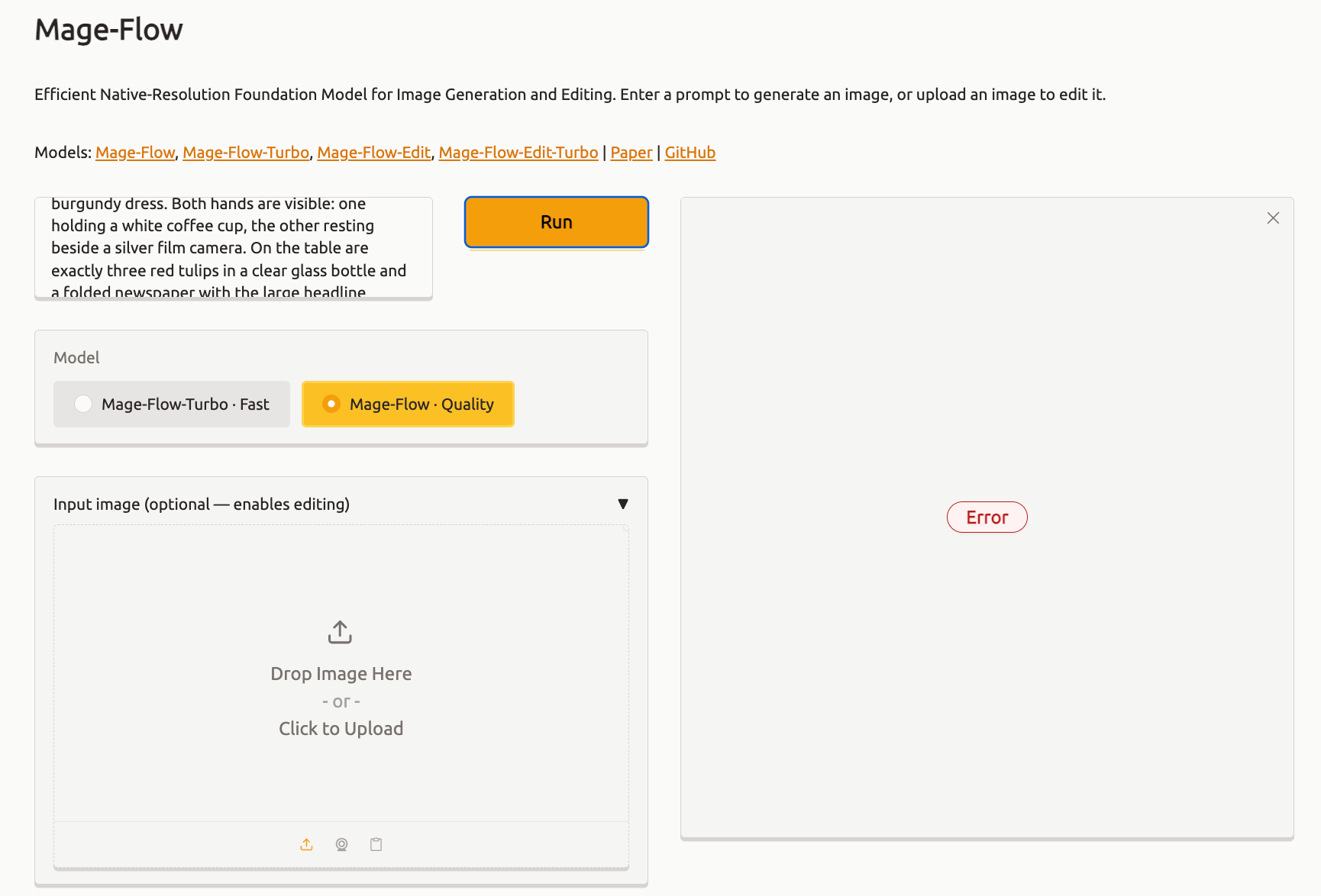
This matters because Quality mode is supposed to represent the serious version of Mage-Flow. Fast mode is built for low latency and uses only four generation steps. Judging the entire model family from Turbo alone would be unfair.
At the same time, come on. This is Microsoft’s official public demo, linked directly from the project. Most people interested in the model will try this before building a CUDA environment and downloading checkpoints. If the interface consumes their credits while returning a blank error, that experience belongs in the review.
The failure may have come from the Hugging Face Space, its available hardware or a temporary queue problem. I cannot prove which part broke because the interface gave me nothing useful to investigate.
Fast Mode Understood the Scene
Fast mode generated an image almost immediately. Credit where it is due: the speed claim was believable.
The result also contained most of the broad scene. There was a woman in a café wearing a beige trench coat over a burgundy dress. She held a white coffee cup. A silver camera, red tulips and a folded newspaper appeared on the table. The wet street outside broadly matched the requested mood.
Both hands were visible and reasonably formed. The composition made sense. Nothing had melted into the table.
Then you looked at the image for longer than two seconds.

The prompt requested exactly three red tulips. Mage-Flow produced two.
The newspaper headline was broken. Smaller print beneath it dissolved into the familiar AI alphabet. The shop sign across the street became more unreadable pseudo-text. Even the branding on the camera looked suspicious.
The woman’s face had the smooth, sharpened appearance of an older generic AI portrait. Her eyebrows, hair, lips and skin all looked manufactured. The lighting was too clean on the subject and strangely flat across the rest of the scene. Instead of a quick smartphone photograph taken in a café, it resembled a synthetic fashion portrait assembled from familiar visual ingredients.
Mage-Flow collected the nouns and somehow lost the photograph.
Fast Is Useful Only When the Result Is Useful
The Fast model is allowed to look worse than Quality mode. Four-step generation involves a compromise, and Microsoft is quite open about that.
Still, speed does not excuse everything.
A fast image can be useful for rough concepts, composition tests, storyboard frames or situations where the final result will be heavily edited. It becomes far less impressive when obvious AI skin, broken text and failed object counting require another generation anyway.
The output feels particularly weak beside current closed models such as Nano Banana Pro, ChatGPT’s image generator and Seedream, which are raising expectations for prompt following, typography and natural-looking people. Those systems are larger, closed and backed by expensive infrastructure. Mage-Flow is trying to solve a different problem.
That distinction matters to researchers. It matters less to someone who typed a prompt and received a worse image.
The Paper and the Public Demo Tell Different Stories
The Mage-Flow paper describes a serious piece of engineering. Microsoft claims the new Mage-VAE reduces encoding work by roughly 12 times and decoding work by 22 times per pixel compared with the FLUX.2 VAE. Its native-resolution training system reportedly improves end-to-end training throughput by around 2.5 times.
The team trained the model across huge datasets, including an initial stage using 1.2 billion filtered and recaptioned image-text pairs. The final family covers text-to-image generation, editing, restoration, appearance changes and structural controls.
None of that becomes false because a Hugging Face demo broke.
Likewise, an impressive architecture does not make my generated image look better. The public result still had two tulips instead of three, broken lettering and a face that screamed AI.
Both things can be true. Mage-Flow may be a valuable open foundation for developers who want to fine-tune a relatively compact model. The current public experience may also be miles away from a convincing consumer image generator.
Can You Run Mage-Flow Locally?
Yes, although “compact” needs some context.
The model is available through Hugging Face and Diffusers, with separate checkpoints for generation, editing and Turbo use. Microsoft’s full setup requires PyTorch, a matching CUDA toolkit and FlashAttention. The reported memory use of roughly 18 to 20GB is low beside giant image models, but it still points toward a high-end Nvidia GPU or rented cloud hardware.
Developers with the right machine can run the regular model locally, control the seed and generation settings, and test it far more thoroughly than I could through the demo.
That may produce much better results. It would also be a different test.
This article covers the experience available to an ordinary person opening Microsoft’s public Space and pressing Run. That experience ended with one weak Fast image, repeated Quality errors and no credits left for the comparison I had planned.
Is Mage-Flow Good?
The honest answer is that I still do not know how good the full Mage-Flow model is.
Quality mode never gave me an image, so declaring the regular model brilliant or terrible would be fiction. I did not get to test editing, multiple seeds, native aspect ratios or the 20-step checkpoint locally.
Fast mode was easier to judge. It was quick, followed the broad composition and produced usable hands. Its visual quality was poor for the kind of photorealistic work I wanted. The result looked artificial, the requested count was wrong and the text fell apart.
The paper gives developers a legitimate reason to investigate Mage-Flow. The public demo gave me a legitimate reason to close the tab.
Microsoft may fix the Space tomorrow. Someone running the full model on a suitable GPU may produce a result that embarrasses this one. For now, though, Mage-Flow’s Fast mode proved that it was fast, while Quality mode proved nothing at all.
Sources
- Microsoft Mage-Flow model card — model family, MIT licence, checkpoints, local installation and benchmark results.
- Mage-Flow research paper — architecture, training data, Mage-VAE efficiency, generation speed and memory claims.
- Microsoft Mage-Flow-Turbo model card — four-step Fast model, performance figures and technical requirements.
- Official Microsoft Mage-Flow demo — the public Hugging Face interface used for the test.