Can Grok 4.6 Beat Claude Opus 5 and GPT-5.6 Sol? We Tested It
We put Grok 4.6 against Claude Opus 5 and GPT-5.6 Sol in five real tasks. It did not win the set, but it proved it can call the best models its peers while charging much less.

Elon Musk obviously wants Grok to beat OpenAI, and his rivalry with Sam Altman now follows every release. Some of his Grok tweets have been cringy. He sounded completely certain that xAI had won before normal users had much reason to agree. Maybe he believed it. Maybe it was promotion. I do not know, and pretending to know his motive would be silly. What we do know is that xAI called Grok 4 “the most intelligent model in the world”. Musk then lost his 2026 case against OpenAI after a jury found that he had waited too long to bring it. The rivalry obviously survived the verdict.
The awkward part was that most normal people did not care. ChatGPT became the default name. Claude took much of the serious coding crowd. Grok remained the AI bolted onto X: useful for asking what was happening under a post, very willing to generate a bikini model and easy to abandon when the work started to matter. Grok 4.6 is the first release that made me wonder whether that judgment was out of date.
It scored 61 on the Artificial Analysis Intelligence Index, level with GPT-5.6 Sol and only two points behind Claude Opus 5 at 63. Then there is the price: $2 per million input tokens and $6 per million output tokens. GPT-5.6 Sol costs $5 and $30. Claude Opus 5 costs $5 and $25. That does not prove Grok is as good, but come on, it makes the comparison worth doing.
So I put Grok 4.6 against two of the strongest models available: GPT-5.6 Sol and Claude Opus 5. I used five ordinary tasks. No math olympiad, no obscure chemistry and no leaderboard chart designed to make one company’s launch post look beautiful. I asked them to explain a VPN misconception, make a laptop recommendation, rewrite an article opening, diagnose a bad webpage from a screenshot and repair a small calculator.
Quick Answer
Grok 4.6 did not beat GPT-5.6 Sol or Claude Opus 5 across my five tests, but it clearly belongs in the same practical tier. Sol was the best model across the set. Grok was the cheapest and wrote the best individual passage. Claude was careful and polished, but rarely better enough to defend its bill.
Grok completed the full set for $0.153, compared with $0.274 for Sol and $0.474 for Claude. It also used far more reported tokens than either rival and took more than four times as long as Sol. The cheap price is real. It is simply less ridiculous in practice than the rate card makes it look.
Grok 4.6 price and independent scores
SpaceXAI lists standard Grok 4.6 pricing at $2 per million input tokens and $6 per million output tokens. A fast version costs twice as much. I used the standard model through OpenRouter.
The direct API comparison looks brutal:
| Model | Input per 1M tokens | Output per 1M tokens |
|---|---|---|
| Grok 4.6 | $2 | $6 |
| Claude Opus 5 | $5 | $25 |
| GPT-5.6 Sol | $5 | $30 |
The official OpenAI model page confirms Sol’s $5/$30 price. Anthropic lists Claude Opus 5 at $5/$25.
Artificial Analysis found that Grok 4.6 gained five points over Grok 4.5 while keeping the same price. It also measured a cost of $0.84 per evaluation task and placed the model on its intelligence-versus-cost Pareto frontier. More importantly, its strongest results appeared in agentic work rather than one narrow static exam. It scored well on knowledge work, banking tasks and terminal use.
The scores give Grok credibility, but they still cannot tell you whether it will be good at your work.
Reddit’s early reaction captured the split fairly well. Some users focused on the coding value and how quickly Grok had closed the gap. Others immediately questioned whether the model had been trained too closely around public tests. One comment summed up the remaining brand problem: people still find it hard to take Grok seriously. That suspicion is partly Musk fatigue and partly something xAI earned through years of declaring victory before users felt it. The only useful response is to test the thing.
How I tested Grok 4.6 against Sol and Claude
I ran Grok 4.6, GPT-5.6 Sol and Claude Opus 5 through OpenRouter on August 13, 2026. Each model received the same prompt in a fresh chat. Reasoning was enabled, while web access and external tools were disabled. I used standard Sol rather than Sol Pro, and standard Grok rather than its double-priced fast variant.
These were small practical tests. Most were deliberately easy because the first question was whether every model could reach a usable answer. Once they did, speed, instruction-following, judgment, token use and final cost became the interesting differences. They do not prove which model is universally smarter.
The writing test was run twice because consistency matters when a model is being asked to preserve someone’s voice. The calculator task used an initial repair prompt and a follow-up feature request. Costs, reported tokens and times below are the figures shown by OpenRouter.
| Test | Grok 4.6 | GPT-5.6 Sol | Claude Opus 5 | Best result |
| VPN explanation | $0.011 / 18.9s | $0.021 / 8.4s | $0.034 / 10.5s | Sol |
| Laptop buyer brief | $0.015 / 20.5s | $0.022 / 0.7s | $0.041 / 10.0s | Sol |
| Article rewrite, two runs | $0.076 / 165.5s | $0.048 / 11.4s | $0.112 / 37.2s | Grok for prose, Sol for efficiency |
| Screenshot diagnosis | $0.020 / 28.2s | $0.066 / 23.6s | $0.098 / 40.7s | Sol |
| Calculator repair and upgrade | $0.031 / 50.0s | $0.117 / 23.0s | $0.189 / 44.7s | All passed; Sol had the best balance |
Each test will include a toggle containing the prompt so you can rerun it. A few chats were deleted, so I rebuilt those prompts from the saved requirements and screenshots instead of pretending I had recovered every sentence word for word. The calculator prompt also needs the original HTML pasted into its marked position. The screenshots show the model name, answer and OpenRouter's displayed cost, token count and completion time. I did not count the hidden reasoning trace as answer quality, and the token figure is OpenRouter's reported usage rather than a universal measure shared by every provider.
Test 1: explaining a VPN misconception
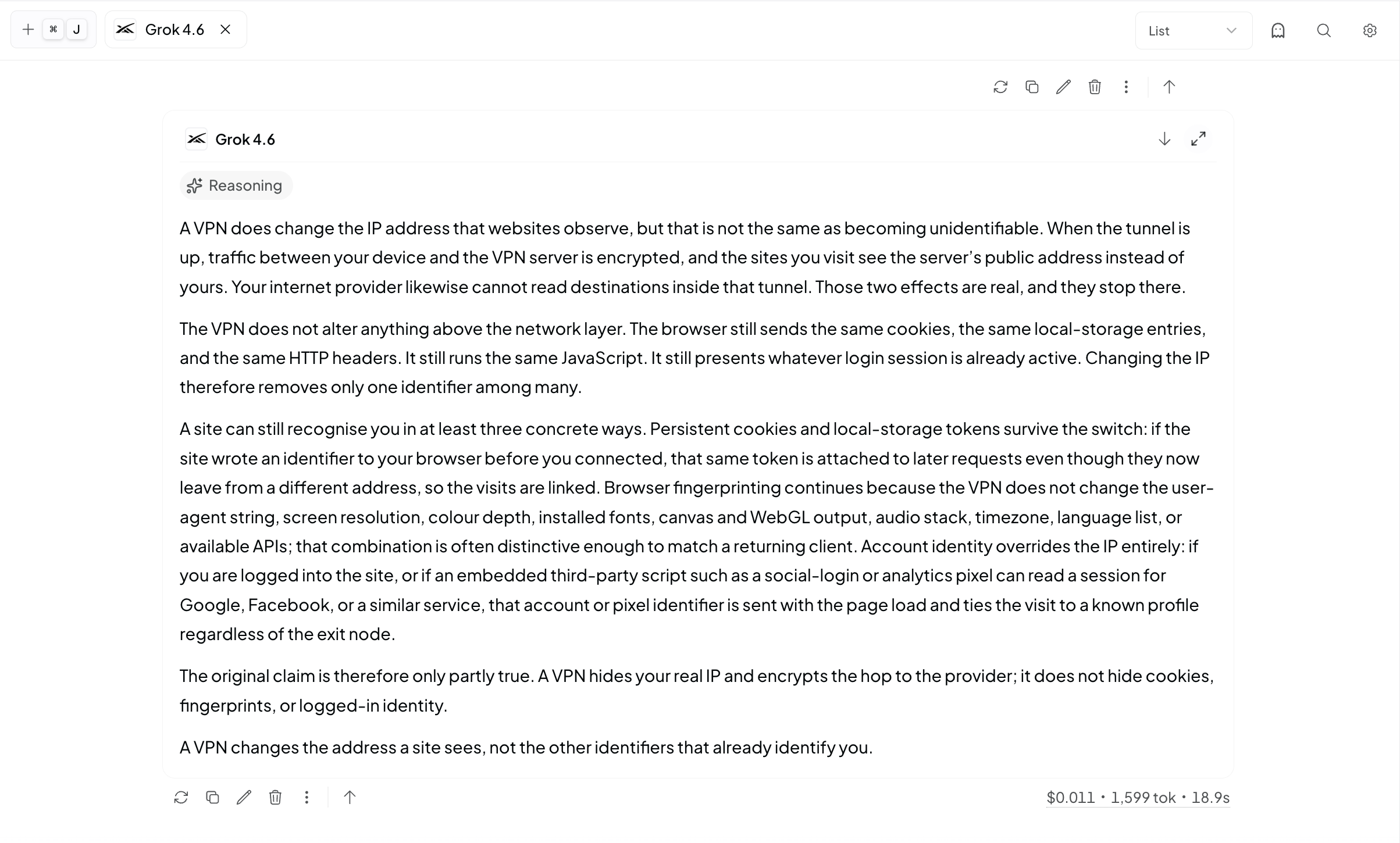
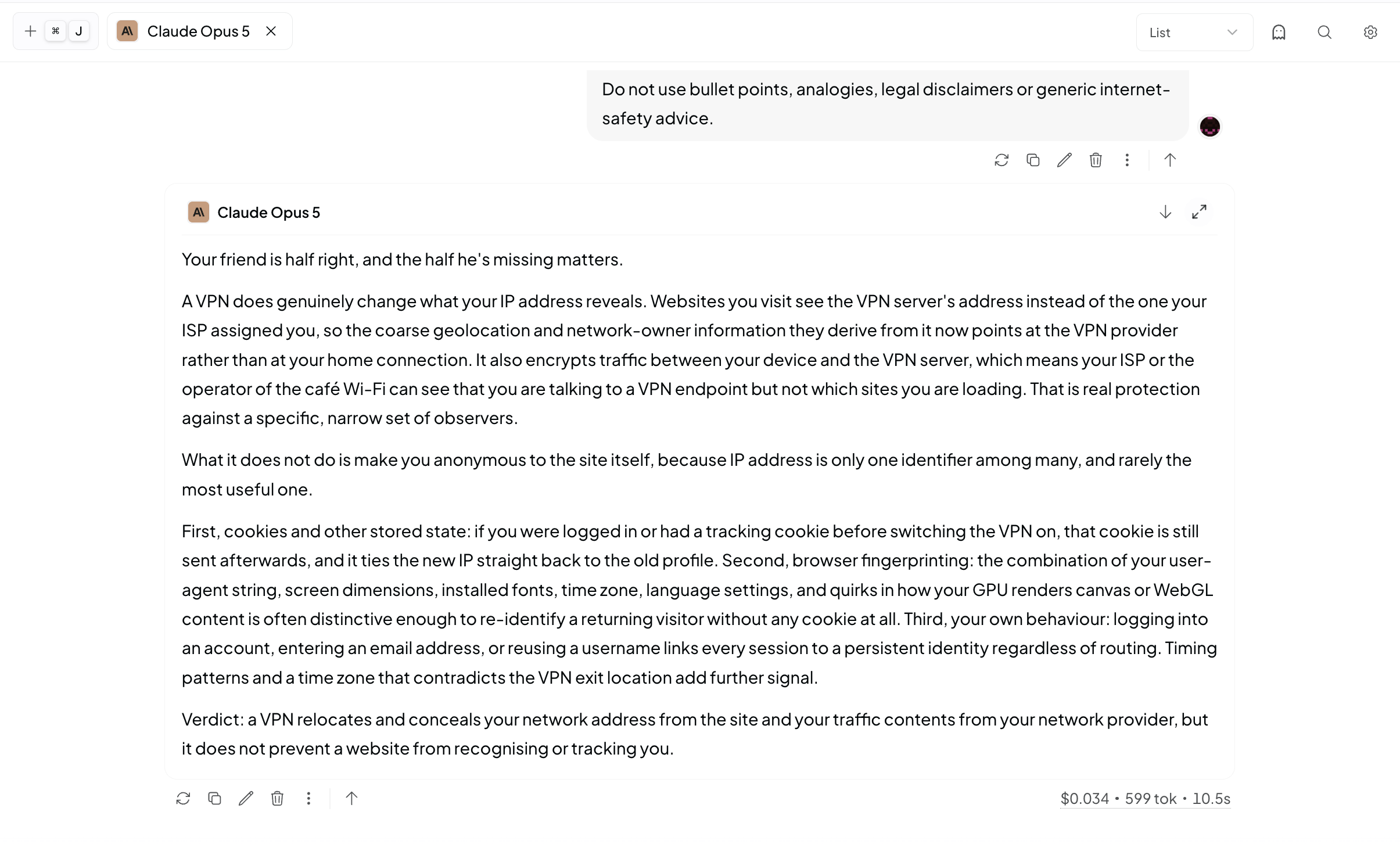
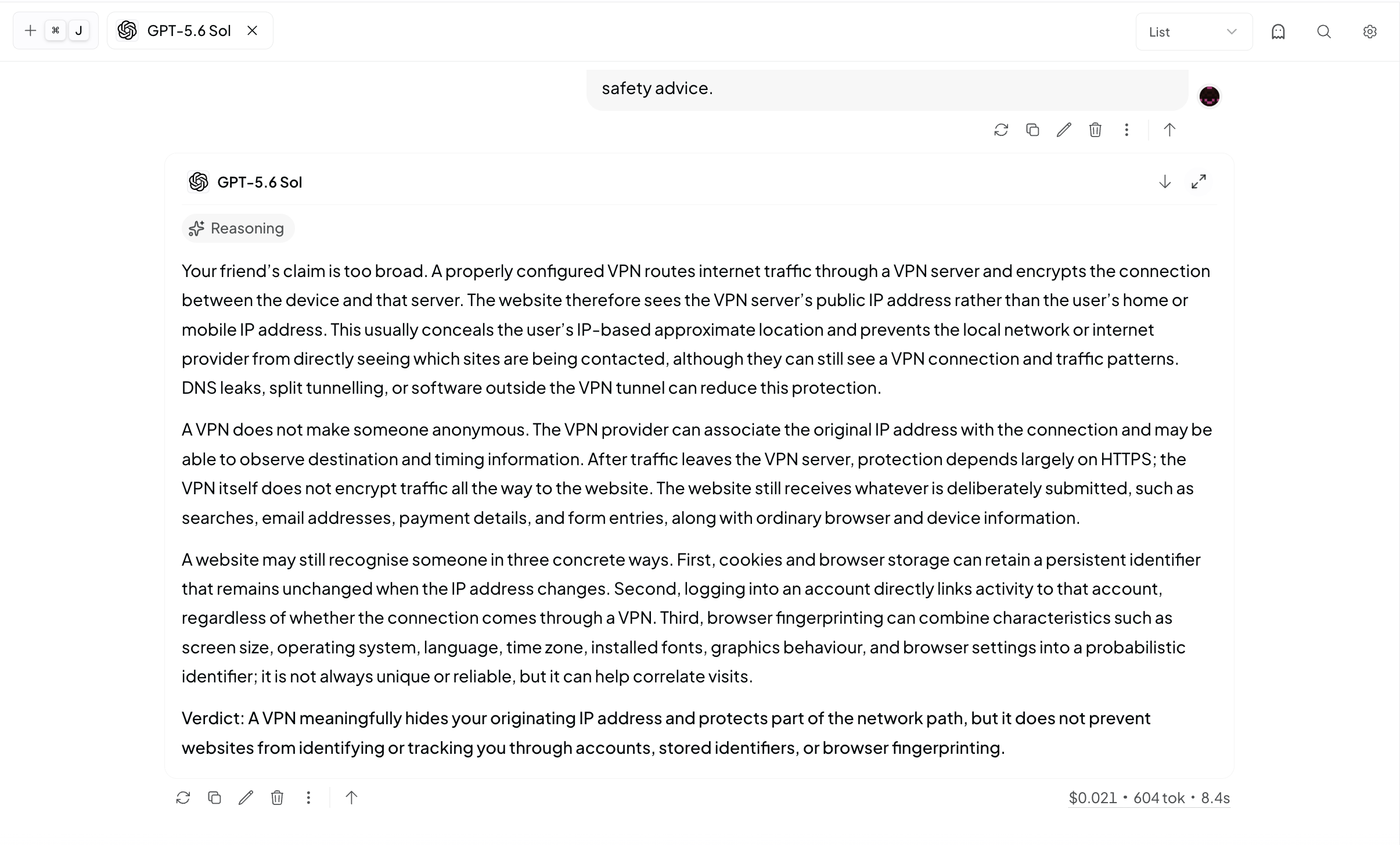
The prompt asked each model to respond to a friend who believed that changing an IP address with a VPN made a person unidentifiable online. The answer needed to explain cookies, browser fingerprinting and logged-in identity without collapsing into generic internet-safety advice.
See the exact VPN test prompt:
A friend says: “A VPN changes your IP address, so websites cannot identify you anymore.”
Write a clear response that separates what a VPN genuinely hides from what it does not. Explain at least three concrete ways a website may still recognise or link a returning visitor after the IP address changes.
End with a direct verdict on whether the claim is true, partly true or false.
Do not use bullet points, analogies, legal disclaimers or generic internet-safety advice.
All three got the central point right. A VPN changes the IP address a website sees and protects the connection between the device and VPN server. It does not remove cookies, browser characteristics or the identity attached to an account.
Sol gave the strongest technical answer. It included sensible qualifications about DNS leaks, split tunnelling and HTTPS without wandering away from the question. Claude was the most natural to read. Grok was correct and impressively detailed for one cent, although it was denser than necessary and made one broad claim about third-party scripts tying visits to known profiles.
Sol won, but Grok did enough to be trusted with the explanation. That matters more than a tiny style gap. The test also connected neatly with my own VPN testing across different countries, where “my IP changed” and “I am anonymous” remain two very different claims.
Test 2: making a laptop recommendation
The buyer brief was intentionally easy. Each model received four laptop options, a hard $1,600 budget and a buyer who valued travel, battery life, large spreadsheets and 25 to 40 browser tabs more than gaming.
See the exact laptop buyer-brief prompt:
You are writing a buyer brief for this person:
- Hard budget: $1,600. Do not recommend anything over it.
- Travels twice a month. Battery life and charger size matter.
- Daily work: writing, research, large spreadsheets and 25–40 browser tabs.
- Occasionally edits short 4K videos.
- Needs at least a 14-inch display, 16GB RAM and 512GB storage.
- Plays games occasionally. Gaming performance is useful, but not worth poor battery life or a heavy charger.
- Wants to keep the laptop for at least four years.
Options and prices:
A. MacBook Air 15 — $1,499 — 16GB RAM, 512GB storage, 1.51kg, 15.3-inch display, excellent battery life, silent operation, modest sustained performance on longer video exports, limited game compatibility.
B. Lenovo Yoga Pro 7 — $1,299 — 32GB RAM, 1TB storage, 1.49kg, 14.5-inch display, good battery life, good general and video performance, weaker gaming than the ASUS.
C. ASUS ROG Zephyrus G14 — $1,599 — 16GB RAM, 1TB storage, 1.50kg, 14-inch display, best gaming and video performance, shorter battery life, louder fans, larger charger.
D. Dell XPS 14 — $1,749 — 32GB RAM, 1TB storage, 1.68kg, 14.5-inch display, good battery life and strong performance.
Eliminate any option that breaks a hard requirement. Rank the remaining three. Recommend exactly one. Explain the deciding trade-off, not every specification. Mention who should choose your second-place option instead. Do not introduce specifications or assumptions that are not provided here. Stay under 350 words.
Every model eliminated the $1,749 Dell XPS 14 and produced the same ranking:
- Lenovo Yoga Pro 7
- MacBook Air 15
- ASUS ROG Zephyrus G14
The point was speed, restraint and whether a model would invent reasons to sound clever after the decision was already obvious.
Sol finished in 697 milliseconds for $0.022 and gave the cleanest brief. Grok cost $0.015 but took 20.5 seconds and used 2,122 reported tokens, nearly four times Sol’s 576. Claude cost $0.041 and introduced a couple of assumptions the prompt had not supplied, including the idea that the buyer could never compensate for the Lenovo’s RAM advantage later.
Nobody failed. Sol simply solved the easy problem like it knew the problem was easy.
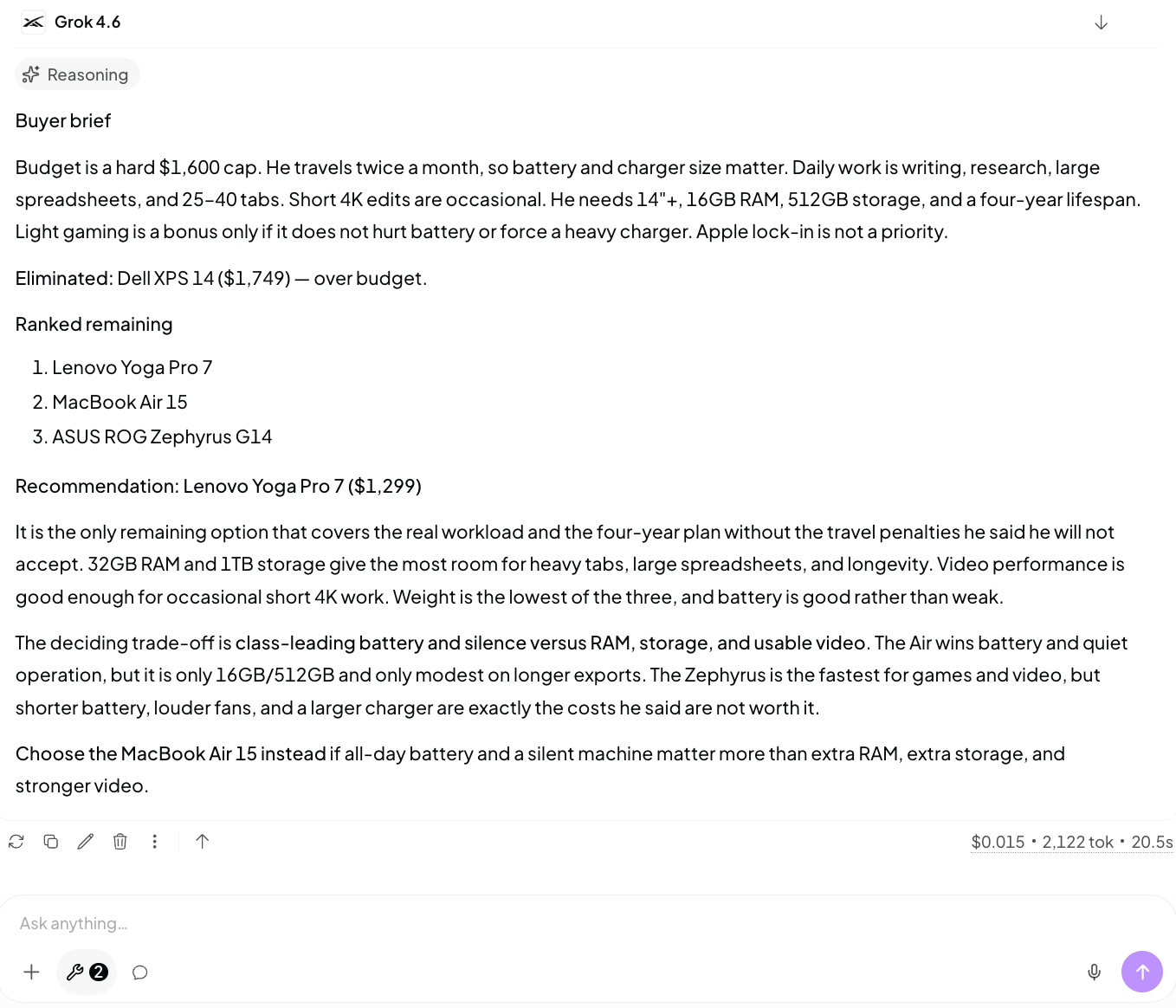
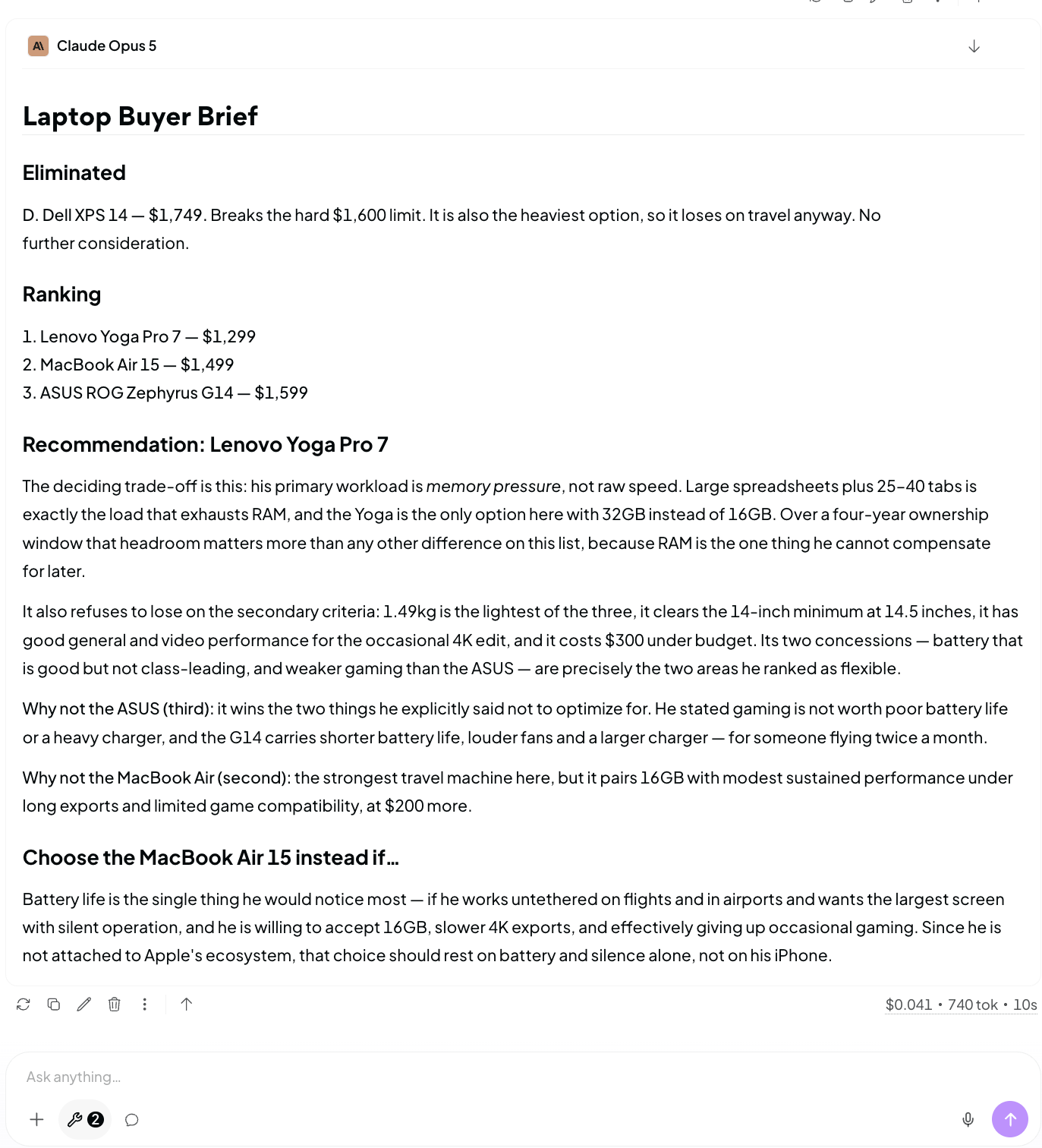
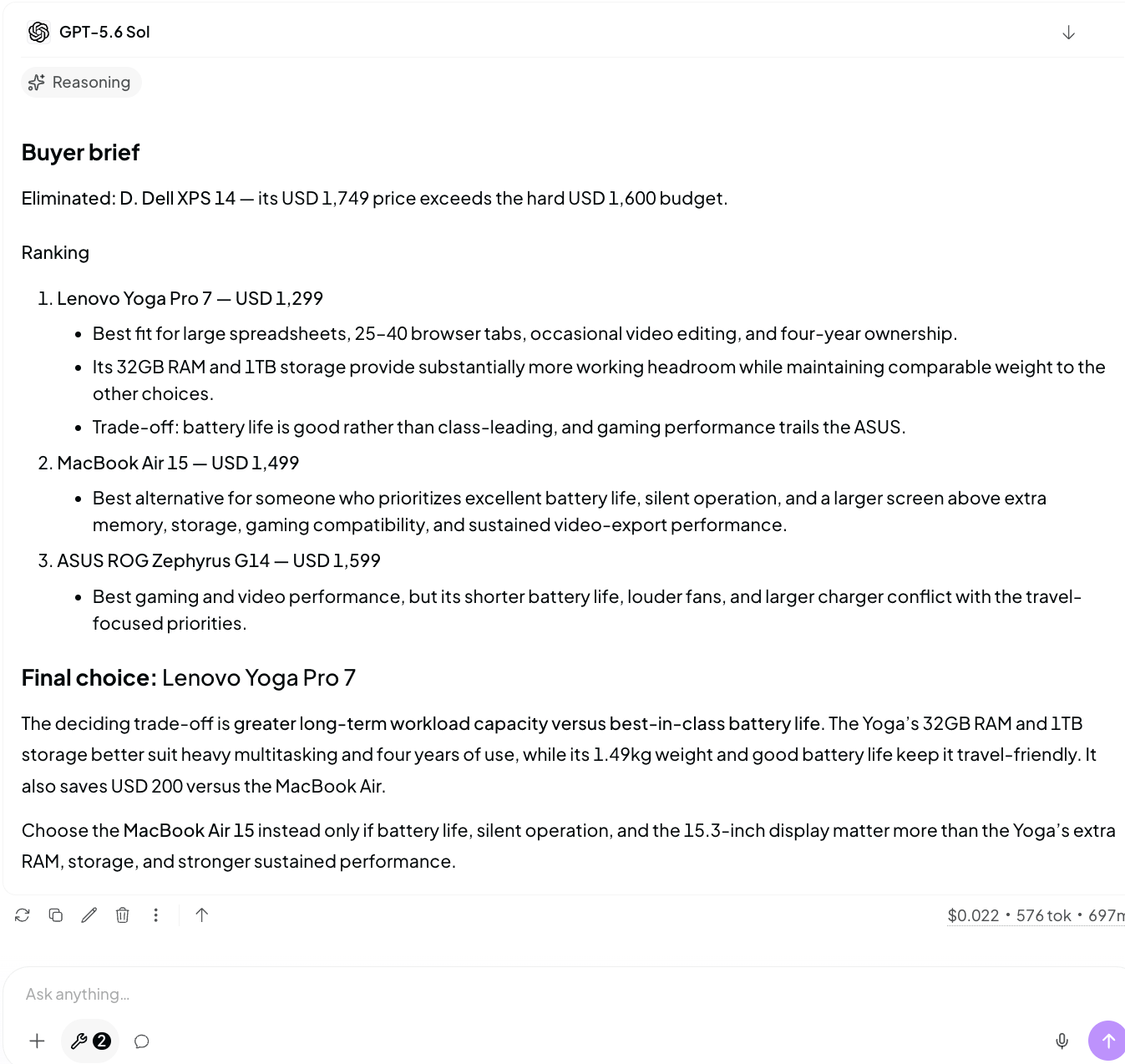
All three models chose the same laptop. Sol reached the answer in 697 milliseconds.
Test 3: rewriting in a real editorial voice
The writing round was where Grok became interesting. I gave each model the rough opening and argument for this article: Musk’s obsession with beating OpenAI, my lukewarm experience with earlier Grok versions, the new Artificial Analysis score and the pricing difference. The job was to clean it up without sanding away the suspicion or inventing personal history. I ran it twice because one polished answer can be luck.
See the exact editorial writing prompt:
Rewrite the draft below as the opening of a These Guys Know article.
Keep the point of view skeptical, personal and direct. Preserve every factual claim and the writer's real experience. Do not invent extra work, documents, code, subscriptions or personal history. Do not turn this into launch-copy praise. Do not use bullet points or headings. Keep it between 450 and 650 words.
Rough draft:
Elon Musk has been trying so hard to beat OpenAI and Sam Altman for years. There have been lawsuits, insults, endless claims that Grok is the smartest AI alive and the usual Elon show around everything he launches. The problem was that normal people did not really care. ChatGPT was ChatGPT. Claude had the serious coding crowd. Grok still felt like the AI attached to X that people mainly used to ask questions underneath posts.
But Grok 4.6 might be the first version where the noise has something real behind it. It scored level with GPT-5.6 Sol on the Artificial Analysis Intelligence Index and costs $2 per million input tokens and $6 output. Sol costs $5 and $30. That does not prove Grok is equally good at everything, and it definitely does not prove Elon has beaten OpenAI.
I tried previous Grok versions on smaller everyday tasks and thought they were cool, but I never trusted them with anything huge. I want to see whether that should change, so I am giving Grok 4.6 the sort of work I used to keep away from it.
Sol was consistently good and absurdly efficient. Across both runs it cost $0.048, used 1,282 reported tokens and took 11.4 seconds. Claude cost $0.112 and occasionally polished the material too hard. In one version it invented details about the sort of code and documents I supposedly trusted to other models.
Grok cost $0.076 across the two runs, so it was more expensive than Sol despite its much lower token rate. It used 12,453 reported tokens and took 165.5 seconds. That is the part the price card does not tell you. It also wrote the best individual version. One line in particular understood the argument: “money is easier to verify than a victory speech.” That sounds like a person noticing the absurdity of AI launch culture rather than a model arranging five tidy paragraphs around a score.
Grok won the prose round. Sol remained the model I would choose if I needed to produce and revise ten pieces without waiting around all afternoon.
![Grok 4.6 writing the strongest editorial passage while taking 72.6 seconds and 5,615 reported tokens.]](https://storage.ghost.io/c/21/2f/212fa2d6-dfa3-4908-9426-ec8fc852e19d/content/images/2026/08/grok3.png)
Test 4: diagnosing a webpage from a screenshot
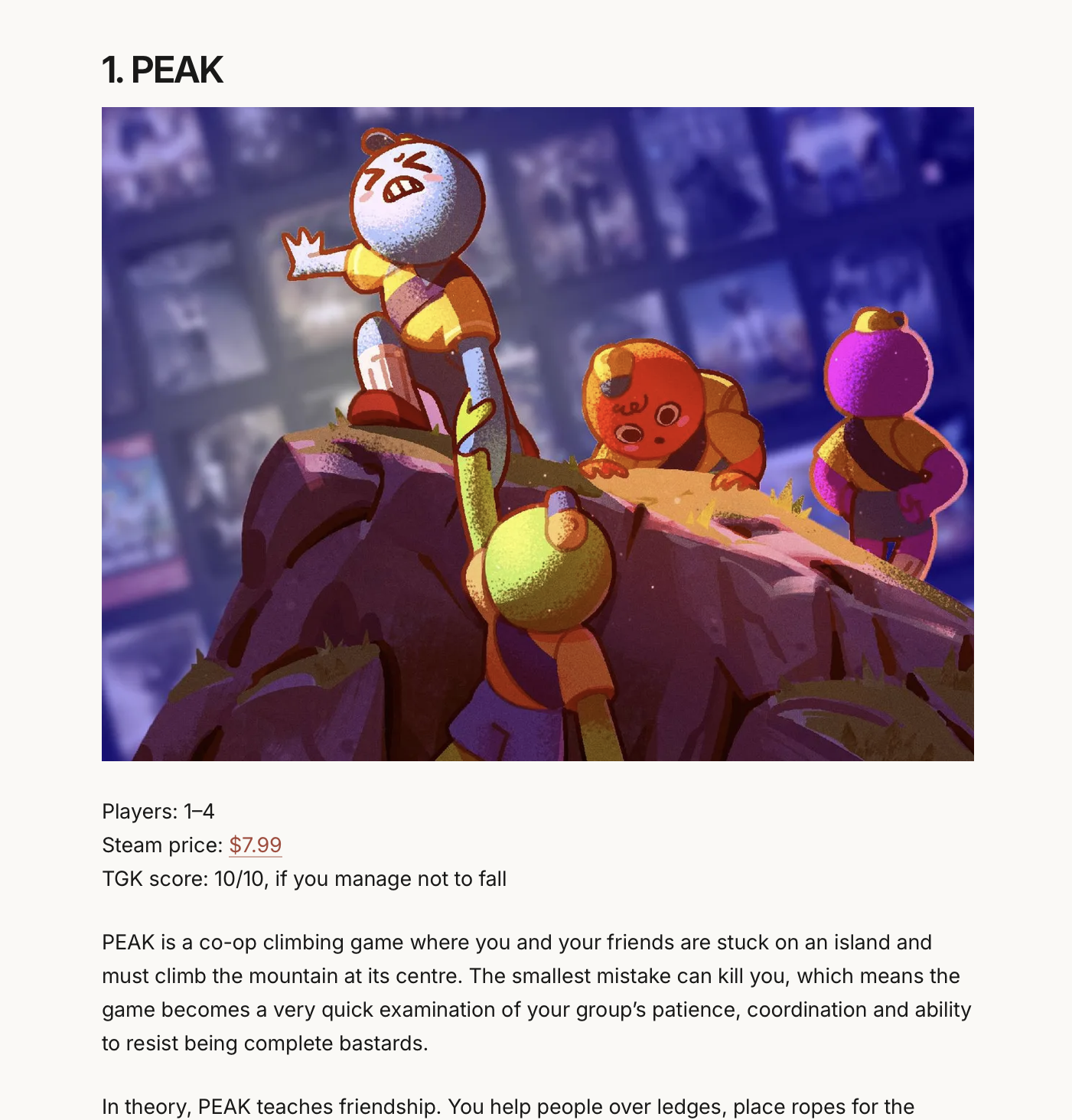
The screenshot round exposed Grok's clearest weakness. I uploaded an article page and asked each model to identify the three most damaging visible design problems. It had to explain what the image proved without inventing CSS, device dimensions or a hidden technical cause.
See the exact visual-diagnosis prompt:
Act as a web designer reviewing the attached screenshot of an article page.
Identify the three most important visible problems, ranked by how much they damage the page.
For each problem:
- Describe exactly what is visible.
- Explain why it looks wrong.
- Recommend a specific visual change.
- State whether the screenshot alone proves the technical cause.
Do not invent CSS selectors, theme code, device dimensions or browser behaviour that cannot be confirmed from the image.
Do not praise the design before identifying the problems. Keep the response under 450 words.
Sol correctly identified the oversized image, underused horizontal space and weak presentation of the article’s facts block. It stayed close to what could be seen and admitted that the screenshot could not reveal the implementation behind it.
Claude found the same core problems, but started designing a much larger solution than the image justified. It recommended exact crop ratios, a sticky mini-navigation and precise measurements. Useful ideas, perhaps, but the assignment was diagnosis.
Grok hallucinated the top of the page. It claimed there was no title, header or navigation even though the screenshot had been taken farther down the article and could not prove any of those things. It spent part of its answer fixing a problem it had invented while missing the weak facts block sitting in front of it.
A tied score cannot become blind trust. Grok can write a sharp paragraph and still confidently misread the evidence in an ordinary screenshot.
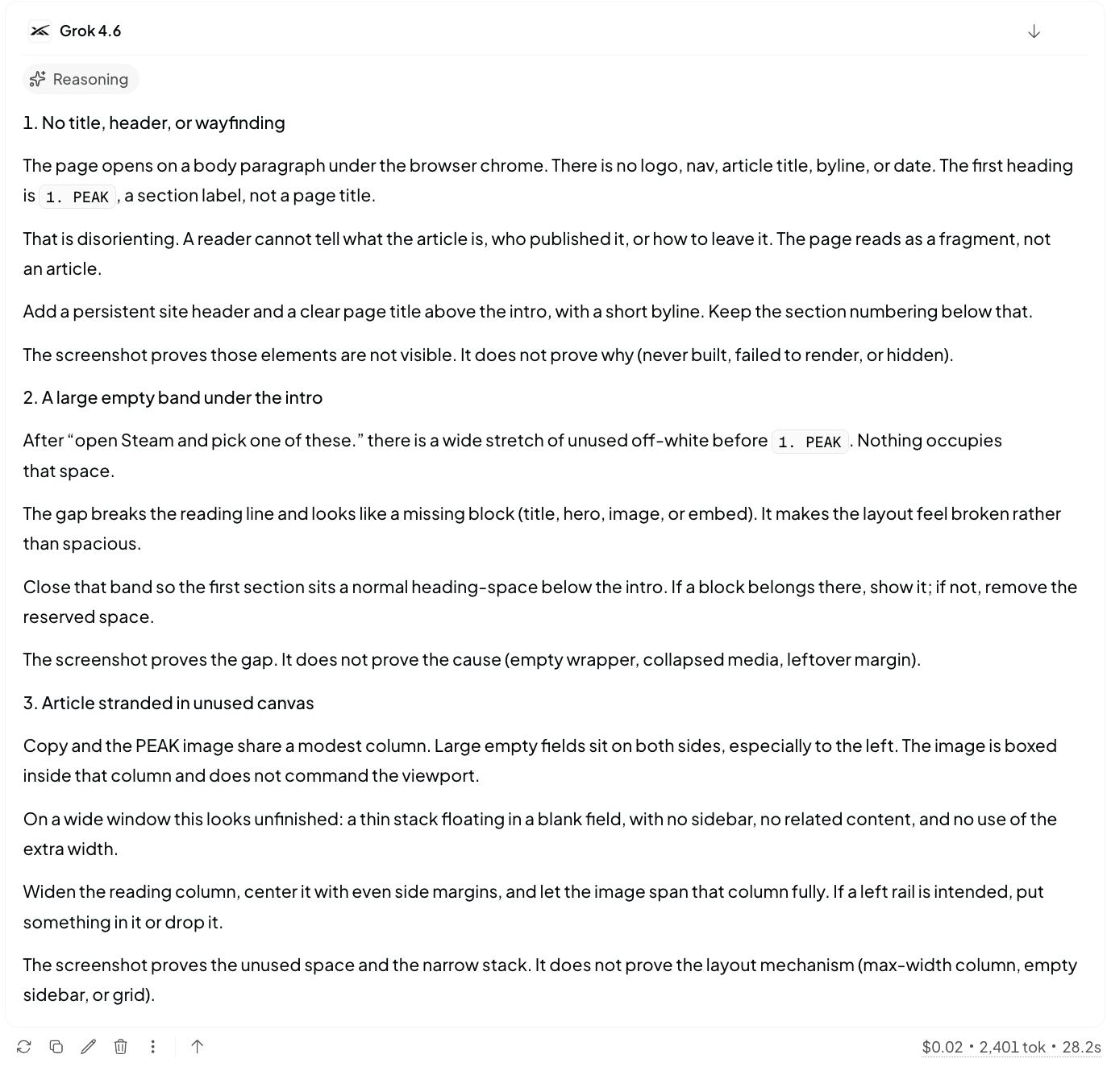
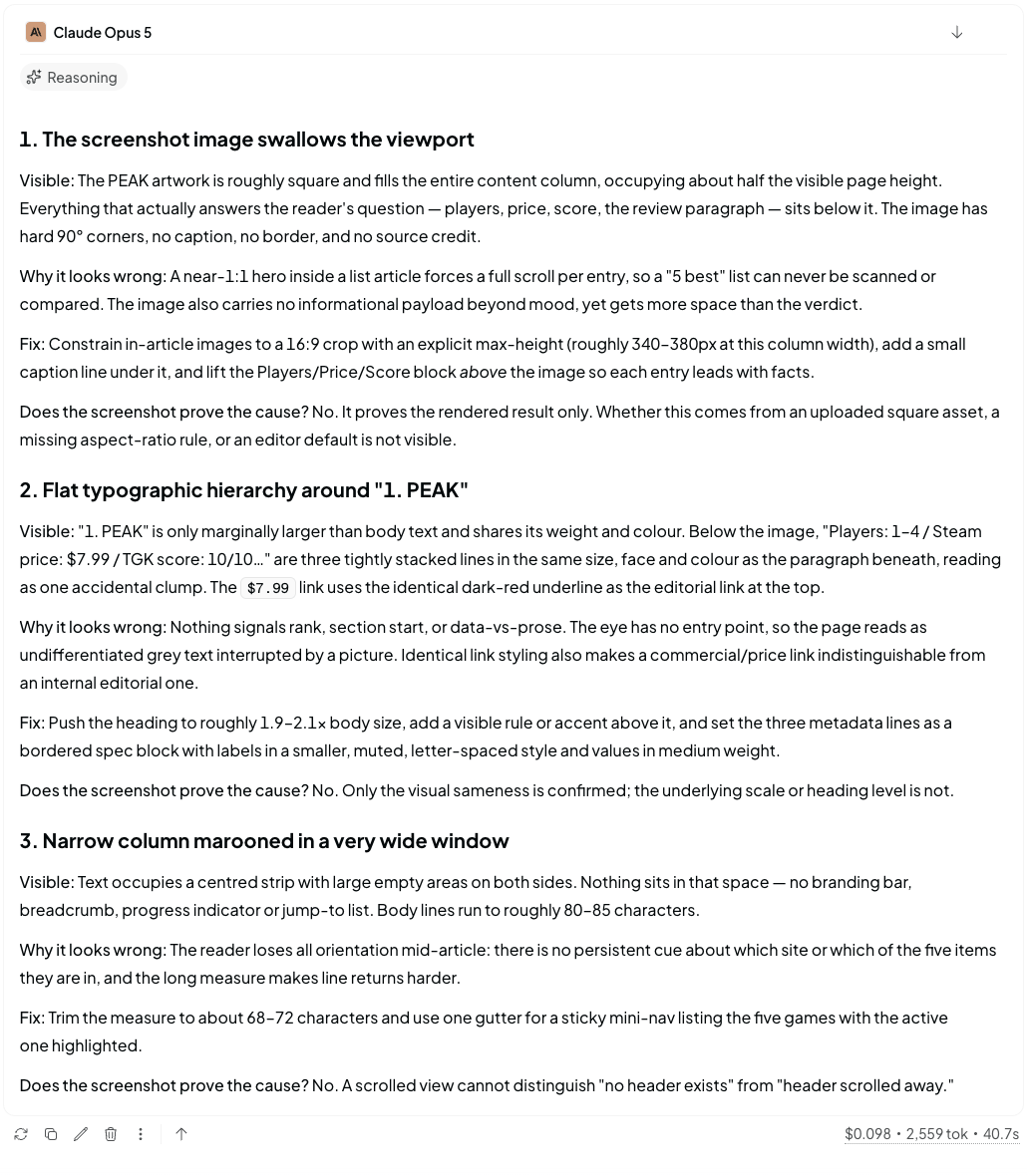
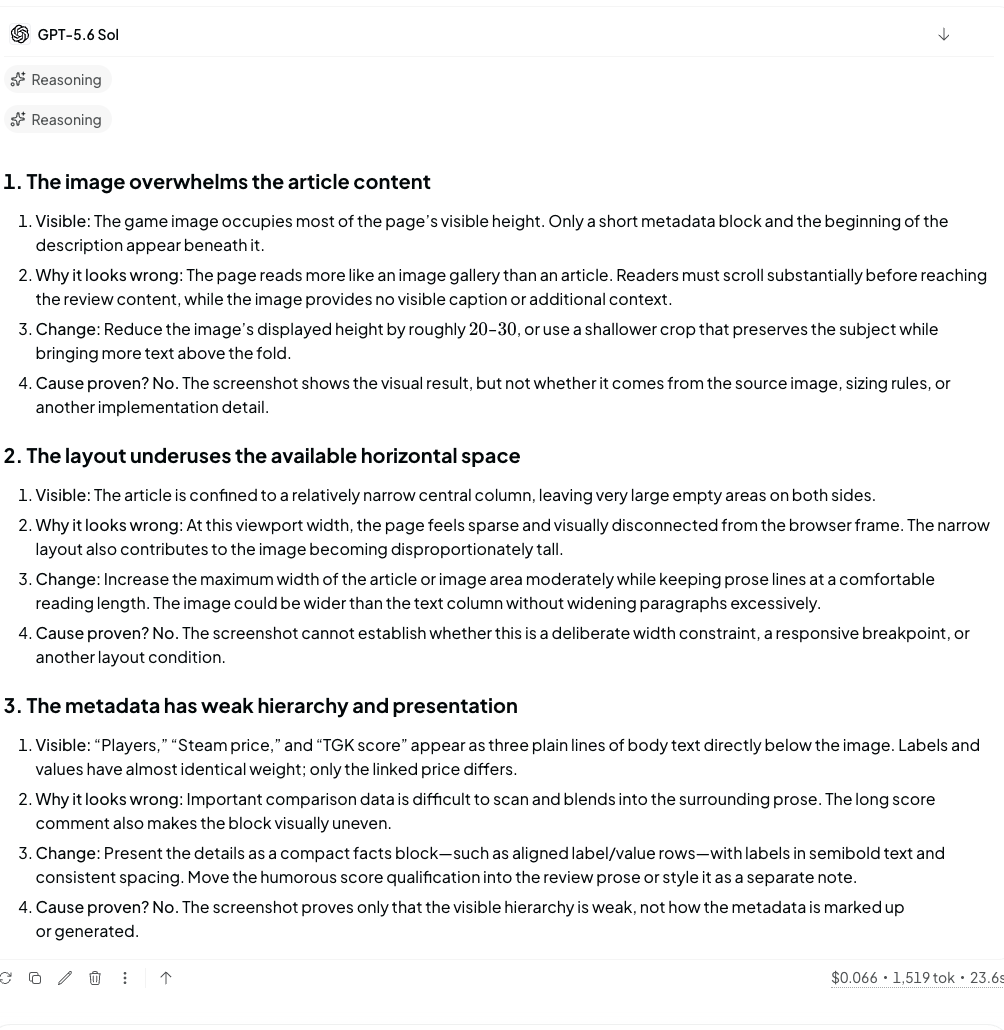
Grok invented a missing title and navigation. Sol stayed with the oversized image, unused width and weak facts block that were actually visible.
Test 5: repairing and extending a calculator
The last task used a small HTML bill-splitting calculator with stale-input bugs. Each model had to make it reread edited values, validate bad inputs and calculate $28.75 for a $100 bill, 15% tip and four people. A follow-up added tip shortcut buttons and an option to round each person’s payment upward.
See the exact visual-diagnosis prompt:
INITIAL REPAIR PROMPT
Fix this single-file HTML bill splitter without changing its basic design. The current calculator can keep stale values instead of reading what the user has just entered.
Requirements:
- Read fresh values every time Calculate is clicked.
- A $100 bill with a 15% tip split among four people must return $28.75 per person.
- Reject blank or non-numeric inputs.
- Reject a negative bill or tip.
- Number of people must be a whole number of at least one.
- Show the validation message in the existing result area.
- Return one complete HTML file with the CSS and JavaScript included. Do not use libraries or frameworks.
RECONSTRUCTED TEST FIXTURE
The original file was deleted with the chats. This fixture recreates the same visible calculator and stale-input failure used in the test. Its JavaScript reads the default values once when the page loads, so changing a field before pressing Calculate still produces the old result.
<!doctype html>
<html lang="en">
<head>
<meta charset="utf-8">
<meta name="viewport" content="width=device-width, initial-scale=1">
<title>Bill Splitter</title>
<style>
* {
box-sizing: border-box;
}
body {
margin: 0;
min-height: 100vh;
display: grid;
place-items: center;
padding: 24px;
background: #f3efe8;
color: #191816;
font-family: Arial, sans-serif;
}
.card {
width: min(100%, 420px);
padding: 28px;
background: #fffdf9;
border: 1px solid #d8d0c5;
}
h1 {
margin: 0 0 22px;
font-size: 32px;
}
label {
display: block;
margin: 16px 0;
font-size: 14px;
font-weight: 700;
}
input {
width: 100%;
margin-top: 7px;
padding: 12px;
border: 1px solid #b9b0a5;
background: white;
color: #191816;
font: inherit;
}
button {
width: 100%;
margin-top: 8px;
padding: 13px;
border: 0;
background: #c45d4d;
color: white;
font: inherit;
font-weight: 800;
cursor: pointer;
}
#result {
min-height: 29px;
margin: 24px 0 0;
font-size: 24px;
font-weight: 800;
}
</style>
</head>
<body>
<main class="card">
<h1>Bill splitter</h1>
<label>
Bill total
<input id="bill" type="number" value="100" step="0.01">
</label>
<label>
Tip percentage
<input id="tip" type="number" value="15" step="1">
</label>
<label>
Number of people
<input id="people" type="number" value="4" step="1">
</label>
<button id="calculate" type="button">Calculate</button>
<p id="result" aria-live="polite"></p>
</main>
<script>
const billInput = document.querySelector('#bill');
const tipInput = document.querySelector('#tip');
const peopleInput = document.querySelector('#people');
const result = document.querySelector('#result');
// Bug: these values are captured once and become stale after an edit.
const bill = Number(billInput.value);
const tip = Number(tipInput.value);
const people = Number(peopleInput.value);
document.querySelector('#calculate').addEventListener('click', () => {
const total = bill + (bill * tip / 100);
const each = total / people;
result.textContent = 'Each person pays $' + each.toFixed(2);
});
</script>
</body>
</html>
FOLLOW-UP PROMPT
Keep the repaired calculator working and make these additions:
- Add 10%, 15% and 20% tip shortcut buttons. Clicking one must update the tip input.
- Add a “Round each person up” checkbox. When selected, round the per-person amount up to the next whole dollar. An exact whole-dollar result must stay unchanged.
- Keep the same visual style and all existing validation.- Return the full updated HTML file.
All three completed the exercise correctly. Every calculator worked, including validation, shortcuts and rounding.
Claude produced the most defensive engineering. It added accessible error states, field focus, Enter-to-calculate support and a small floating-point safeguard. It also cost $0.189 for the two prompts.
Sol’s version was cleaner and finished in 23 seconds for $0.117. Grok’s implementation was less polished visually, but it worked for $0.031.
This was Grok’s clearest value win. Once all three models produced a working calculator, the expensive answer did not become more correct because its error handling was prettier. Claude’s care would matter more in production software. For a small repair, Grok gave me the result for roughly one-sixth of Claude’s cost.
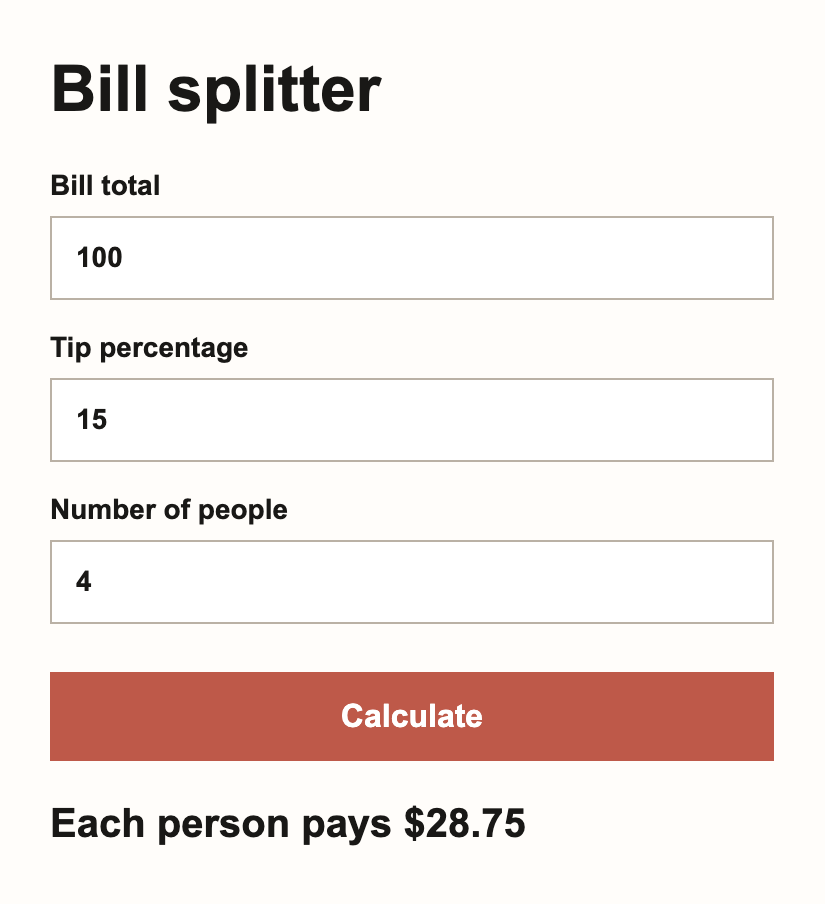
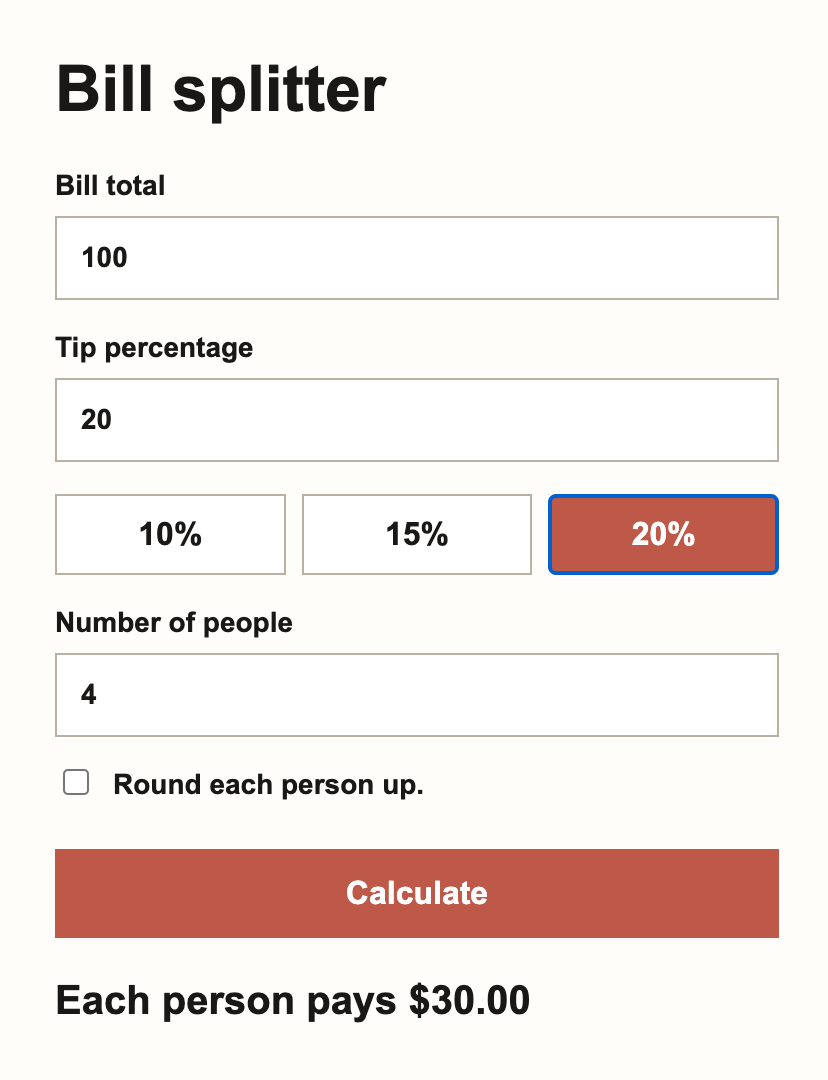
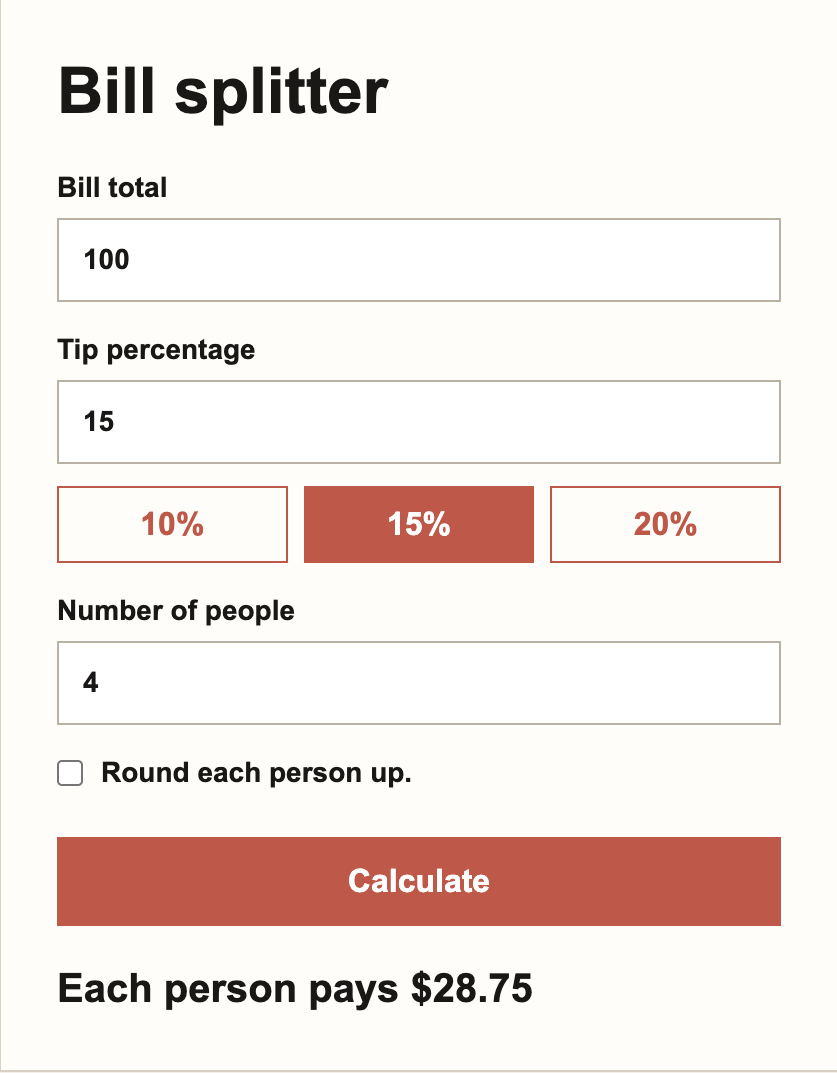
Every model repaired the calculator and completed the feature request. The useful difference was cost and implementation detail, not whether the app worked.
The total cost changed the story
Here are the totals across the full test set, including the repeated writing prompt and two-stage calculator task:
| Model | OpenRouter cost | Reported tokens | Total time |
| Grok 4.6 | $0.153 | 22,530 | 283.1s |
| GPT-5.6 Sol | $0.274 | 7,333 | 67.1s |
| Claude Opus 5 | $0.474 | 11,729 | 143.1s |
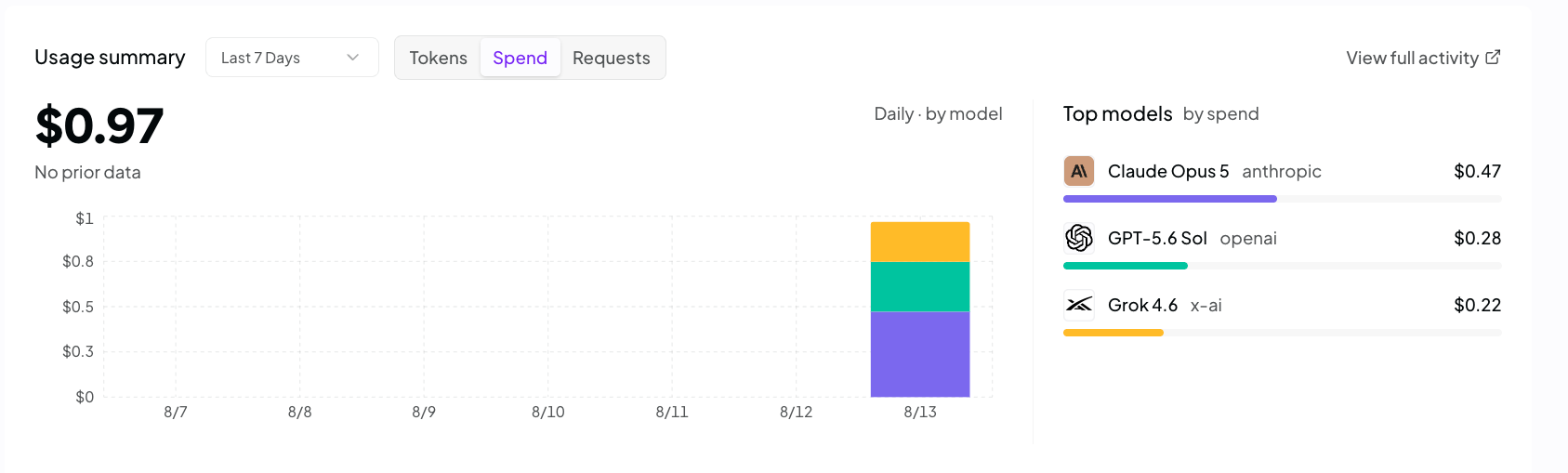
Grok was about 44% cheaper than Sol and 68% cheaper than Claude. That is meaningful. It was nowhere near five times cheaper than Sol across the completed work, even though its output token rate is one-fifth of Sol’s.
The model spent too many tokens thinking and took too long getting there. Grok used more than three times as many reported tokens as Sol and required more than four times the wall-clock time.
Artificial Analysis measures Grok 4.6 as highly cost-efficient across its own test suite, so my result does not disprove the larger pricing case. It shows why developers need to try a model on their own workload. A cheap token is useful. A model that buys three of them where a rival buys one can give part of that advantage straight back.
There was another surprise. Grok’s standard version felt slow in my OpenRouter tests, despite independent measurements showing competitive generation speed after output begins. Those are different measurements. My times include the complete wait through reasoning and generation on the route I used. If latency matters, the standard model needs testing inside the exact product where it will run. SpaceXAI’s faster variant may solve that problem, but it doubles the price.
Is Grok 4.6 better than GPT-5.6 Sol?
No, not from these tests. Sol won the practical comparison. It gave the best factual explanation, the cleanest buyer brief and the strongest screenshot diagnosis. It was also much faster and remarkably disciplined with tokens. Grok produced better prose in one round and completed the same calculator task for much less money.
Calling Grok better would turn a useful test into launch-day fan fiction. Calling it irrelevant would be just as silly.
Grok 4.6 now belongs in the same conversation. If your work involves high-volume coding repairs, drafting or agent tasks where a human checks the final result, its price deserves a real pilot. If you care about low latency, visual judgment and predictable brevity, Sol remains easier to recommend. Claude Opus 5 still makes sense when defensive engineering and careful verification matter enough to pay for it.
Is Grok 4.6 better than Claude Opus 5?
Not from these tests. Claude produced the most defensive calculator repair and generally wrote polished, careful answers. Grok was dramatically cheaper, beat Claude on the best individual writing sample and finished every coding requirement. Claude's screenshot advice also overreached less seriously than Grok's, although Sol handled that task better than both.
The practical choice depends on the cost of a mistake. For small code repairs and checked drafts, Grok's price is difficult to ignore. For production work where stronger validation and defensive handling save a human review cycle, Opus can still earn the premium. My five tests show a credible value rival, not a clean replacement.
Final verdict: Grok 4.6 is in the same league now
All the Musk and Altman drama is entertaining, but it tells you almost nothing about which API deserves your money. xAI does not need Grok to crush every OpenAI or Anthropic model. It only needs to stay close enough that developers start asking why one output token costs $6 here and $30 there.
The five tasks were small and straightforward, so there was nowhere to hide behind a spectacular demo. All three models could do the work. Sol got there fastest and made the best calls. Claude was the most careful with code. Grok kept reaching a usable result at a much lower cost.
I still would not hand Grok every job without checking it. The screenshot mistake was bad, and the long waits were hard to ignore. Earlier versions trained me to treat Grok as the clever AI under an X post, or the thing people used to generate another swimsuit model. Version 4.6 is the first one that made that habit feel out of date. It is in the same league now, and the price difference is large enough to matter.
Frequently asked questions
How much does Grok 4.6 cost?
Standard Grok 4.6 starts at $2 per million input tokens and $6 per million output tokens. SpaceXAI also offers a faster variant at twice that price.
Is Grok 4.6 as good as GPT-5.6 Sol?
It is in the same broad capability tier, but the models behave differently. Artificial Analysis gives both a score of 61. In my tests, Sol was faster and more reliable across ordinary tasks, while Grok was cheaper and sometimes the better writer.
Is Grok 4.6 as good as Claude Opus 5?
It was competitive on the ordinary tasks I tested, but it did not beat Claude across the set. Grok was much cheaper and produced the best individual rewrite. Claude gave the most defensive code repair. Artificial Analysis scores Claude Opus 5 two points higher, at 63 versus Grok's 61.
Is Grok 4.6 good for coding?
It handled my small calculator repair and follow-up feature request correctly. That is encouraging evidence for scoped coding work, although one successful HTML and JavaScript task cannot establish performance on large repositories or autonomous agents.
Is Grok 4.6 cheaper in real use?
It was cheaper across my full test set, costing $0.153 versus $0.274 for GPT-5.6 Sol and $0.474 for Claude Opus 5. Its higher token use reduced the advantage suggested by the headline API rates.